


Signature on Replies

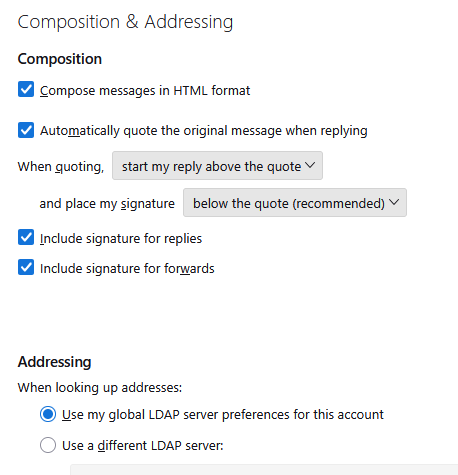
I have a Signature setup and it works great on NEW Emails, however, if I click on reply to an email the signature is not there. I have the checkbox checked for "Include signature for replies" but it doesn't seem to work. I've tried unchecking it, restarting the app, re-checking it and restarting again, still doesn't work.
Windows 11 Pro, Version 10.0.26200 Build 26200
선택된 해결법
Just a guess here: I think you may be looking below the response. Instead, look at bottom of entire message, as that is where you specified it to appear.
문맥에 따라 이 답변을 읽어주세요 👍 1모든 댓글 (3)
선택된 해결법
Just a guess here: I think you may be looking below the response. Instead, look at bottom of entire message, as that is where you specified it to appear.
David,
That was it, thanks very much. I changed it and its working like I expected. I really appreciate it.