


I get frequent errors that "connection to server pop.xxx.net.il was reset." but at the same time, TB does download my messages

A search showed that others have experienced this same error message, but as far as I can tell, they all were unable to access their email. These messages began appearing about a month ago. They pop up in Troubleshooting Mode. They did not in Windows Safe Mode. AVG and ZoneAlarm are not the culprits.
글쓴이 Wayne Mery 수정일시
모든 댓글 (10)
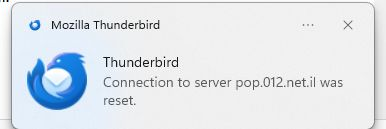
Thanks. Please also always state your full Thunderbird version number. If it is ESR 140, then the cause is unlikely to be Thunderbird.

They did not in Windows Safe Mode. AVG and ZoneAlarm are not the culprits.
Windows safe mode disables anti-virus software. If the problem doesn't occur in Windows safe mode, this strongly suggests that anti-virus software is involved.
These are some generic suggestions to avoid problems with anti-virus software.
Create an exception in your anti-virus software for the Thunderbird profile folder, so that the anti-virus real-time scanner will not scan it. https://support.mozilla.org/en-US/kb/profiles-where-thunderbird-stores-user-data#w_how-to-find-your-profile
Don't let your anti-virus software scan incoming and outgoing messages.
Don't let your anti-virus software scan attachments.
Don't let your anti-virus software intercept your secure connection to the server.
Remove any add-ons your anti-virus software may have installed in Thunderbird.
Keep it working. https://kb.mozillazine.org/Keep_it_working_-_Thunderbird
And last but not least, backup your Thunderbird profile on a regular basis. https://support.mozilla.org/kb/profiles-where-thunderbird-stores-user-data#w_backing-up-a-profile
Wrt Zone Alarm firewall - what is this good for? Windows has a built-in firewall, and there is absolutely no need for any 3rd-party firewall solution.
Thank you for your reply. I ruled out AVG because I disabled it temporarily and the error messages kept on coming. ZoneAlarm: I've been using the free version since long before Windows added a firewall. I trust it, so why switch?
re :I ruled out AVG because I disabled it temporarily
If you stop AVG then the default Windows Anti-virus will start. So not a real test. Only a restart computer in 'Safe Mode with Networking' would offer a real test. You would need to connect computer to router via an ethernet cable to do this.
Suggestion: access AVG and see if it has a VPN enabled. Do you use AVG Secure VPN ? If yes, switch it off.
Firewall - Access Firewall (might be controlled by computer default or by AVG or by ZoneAlarm) and set up Thunderbird program as allowed. Please confirm you have done this.
I'm not sure why you have ZoneAlarm as Firewall because you also have AVG and I thought it also has Firewall, not to mention Windows offers a Firewall as well. Maybe there is a conflict with more than one Firewall operating and one of them is blocking Thunderbird's access.
Toad-Hall, thank you for your suggestions. I thought I covered my reason for using ZA in my previous post. To repeat: I've been using it for literally decades and I trust it, so I continue to use it even though I have other options. In order to respond properly, I checked. Windows firewall is off. I can't tell if AVG's firewall is on, but I do know that I never turned it on myself. Oddly, Windows reports that ZA NextGen is off, whereas ZA itself tells me I'm protected. And ZA has ZERO programs blocked. Your point about Windows turning on Defender if AVG is turned off is a good one. I'll have to test that. Edit: Okay, I just turned off AVG. Windows displayed a message offering me the opportunity to turn on Defender, but it did not do so automatically. And I still got the TB message. And no, I don't use AVG Secure VPN. End edit. I'll post back when I've had a chance to do that.
christ1, I suddenly realized that I somehow forgot about your post. I hope to try your suggestions soon, as well. Edit: I added TB's profile to AVG's exceptions. So far, so good, but it's way too early to tell. Nope, that didn't do it. Will have to try more suggestions.
글쓴이 doniel 수정일시