


Javascript components causing frequent crashes in V145.0
The latest crash:
b1ad0fde-1882-41ce-9b80-4fd3e2c5ac20 java.lang.OutOfMemoryError: Failed to allocate a 134217744 byte allocation with 50331584 free bytes and 120MB until OOM, target footprint 125474336, growth limit 201326592
* New Sentry Instance: https://sentry.io/organizations/mozilla/issues/?project=6375561&query=e9bad27f848049fca9e39dc6b2d0abd5
* Socorro: https://crash-stats.mozilla.org/report/index/bp-22da7755-1702-4479-8d06-ab0d60251118
java.lang.OutOfMemoryError: Failed to allocate a 134217744 byte allocation with 50331584 free bytes and 120MB until OOM, target footprint 125474336, growth limit 201326592 at java.util.Arrays.copyOf(Arrays.java:3578) at java.io.ByteArrayOutputStream.grow(ByteArrayOutputStream.java:120) at java.io.ByteArrayOutputStream.ensureCapacity(ByteArrayOutputStream.java:95) at java.io.ByteArrayOutputStream.write(ByteArrayOutputStream.java:156) at kotlin.io.ByteStreamsKt.copyTo(IOStreams.kt:19) at kotlin.io.ByteStreamsKt.readBytes(IOStreams.kt:21) at mozilla.appservices.httpconfig.FetchBackend.sendRequest$lambda$3(FetchBackend.kt:6) at mozilla.appservices.httpconfig.FetchBackend.sendRequest(FetchBackend.kt:274) at mozilla.appservices.viaduct.uniffiCallbackInterfaceBackend$sendRequest$callback$makeCall$1.invokeSuspend(viaduct.kt:49) at mozilla.appservices.viaduct.uniffiCallbackInterfaceBackend$sendRequest$callback$makeCall$1.invoke(viaduct.kt:2) at mozilla.appservices.viaduct.uniffiCallbackInterfaceBackend$sendRequest$callback$makeCall$1.invoke(viaduct.kt:1) at mozilla.appservices.viaduct.uniffiCallbackInterfaceBackend$sendRequest$callback$$inlined$uniffiTraitInterfaceCallAsyncWithError$1.invokeSuspend(viaduct.kt:39) at kotlin.coroutines.jvm.internal.BaseContinuationImpl.resumeWith(ContinuationImpl.kt:9) at kotlinx.coroutines.DispatchedTask.run(DispatchedTask.kt:122) at kotlinx.coroutines.scheduling.CoroutineScheduler$Worker.run(CoroutineScheduler.kt:127) Suppressed: kotlinx.coroutines.internal.DiagnosticCoroutineContextException: [StandaloneCoroutine{Cancelling}@2104835, Dispatchers.Default]
HELP!!!!
글쓴이 Cajundweeb 수정일시
선택된 해결법
Tushar, When I'm surfing in Firefox, it works fine for a few moments, then suddenly starts to freeze up, then abruptly closes. I had checked the crash reports and it's been showing errors with Javascript and memory issues. Here's an example of the crashes I've been seeing in the crash reports:
fc2c6695-5e71-4d58-b043-c1b8b241d7fc java.lang.OutOfMemoryError: Failed to allocate a 56 byte allocation with 878696 free bytes and 858KB until OOM, target footprint 201326592, growth limit 201326592; giving up on allocation because <1% of heap free after GC.
* New Sentry Instance: https://sentry.io/organizations/mozilla/issues/?project=6375561&query=7f9a066ab8d14ea99a2eb8c5ccde82c0
* Socorro: https://crash-stats.mozilla.org/report/index/bp-239b5627-de67-4322-88bb-8a7b60251110
java.lang.OutOfMemoryError: Failed to allocate a 56 byte allocation with 878696 free bytes and 858KB until OOM, target footprint 201326592, growth limit 201326592; giving up on allocation because <1% of heap free after GC. at android.os.Parcel.nativeReadString16(Native Method) at android.os.Parcel.readString16NoHelper(Parcel.java:3177) at android.os.Parcel$ReadWriteHelper.readString16(Parcel.java:510) at android.os.Parcel.readString16(Parcel.java:3156) at android.os.Parcel.readString(Parcel.java:3146) at android.view.accessibility.IAccessibilityInteractionConnection$Stub.onTransact(IAccessibilityInteractionConnection.java:181) at android.os.Binder.execTransactInternal(Binder.java:1380) at android.os.Binder.execTransact(Binder.java:1311)
9880263c-83ad-4ae4-b012-610de1bbd260
<native crash>
* Socorro: https://crash-stats.mozilla.org/report/index/bp-2782f1c0-b1d3-46d6-a603-cdfb40251110
<native crash>
Hope this information is of use in diagnosing the problem.
모든 댓글 (6)

what do you mean by java component? can you share more info, context or maybe screenshot!
선택된 해결법
Tushar, When I'm surfing in Firefox, it works fine for a few moments, then suddenly starts to freeze up, then abruptly closes. I had checked the crash reports and it's been showing errors with Javascript and memory issues. Here's an example of the crashes I've been seeing in the crash reports:
fc2c6695-5e71-4d58-b043-c1b8b241d7fc java.lang.OutOfMemoryError: Failed to allocate a 56 byte allocation with 878696 free bytes and 858KB until OOM, target footprint 201326592, growth limit 201326592; giving up on allocation because <1% of heap free after GC.
* New Sentry Instance: https://sentry.io/organizations/mozilla/issues/?project=6375561&query=7f9a066ab8d14ea99a2eb8c5ccde82c0
* Socorro: https://crash-stats.mozilla.org/report/index/bp-239b5627-de67-4322-88bb-8a7b60251110
java.lang.OutOfMemoryError: Failed to allocate a 56 byte allocation with 878696 free bytes and 858KB until OOM, target footprint 201326592, growth limit 201326592; giving up on allocation because <1% of heap free after GC. at android.os.Parcel.nativeReadString16(Native Method) at android.os.Parcel.readString16NoHelper(Parcel.java:3177) at android.os.Parcel$ReadWriteHelper.readString16(Parcel.java:510) at android.os.Parcel.readString16(Parcel.java:3156) at android.os.Parcel.readString(Parcel.java:3146) at android.view.accessibility.IAccessibilityInteractionConnection$Stub.onTransact(IAccessibilityInteractionConnection.java:181) at android.os.Binder.execTransactInternal(Binder.java:1380) at android.os.Binder.execTransact(Binder.java:1311)
9880263c-83ad-4ae4-b012-610de1bbd260
<native crash>
* Socorro: https://crash-stats.mozilla.org/report/index/bp-2782f1c0-b1d3-46d6-a603-cdfb40251110
<native crash>
Hope this information is of use in diagnosing the problem.
Tushar, When I'm surfing in Firefox, it works fine for a few moments, then suddenly starts to freeze up, then abruptly closes. I had checked the crash reports and it's been showing errors with Javascript and memory issues. Here's an example of the crashes I've been seeing in the crash reports:
fc2c6695-5e71-4d58-b043-c1b8b241d7fc java.lang.OutOfMemoryError: Failed to allocate a 56 byte allocation with 878696 free bytes and 858KB until OOM, target footprint 201326592, growth limit 201326592; giving up on allocation because <1% of heap free after GC.
- New Sentry Instance: https://sentry.io/organizations/mozilla/issues/?project=6375561&query=7f9a066ab8d14ea99a2eb8c5ccde82c0
- Socorro: https://crash-stats.mozilla.org/report/index/bp-239b5627-de67-4322-88bb-8a7b60251110
java.lang.OutOfMemoryError: Failed to allocate a 56 byte allocation with 878696 free bytes and 858KB until OOM, target footprint 201326592, growth limit 201326592; giving up on allocation because <1% of heap free after GC. at android.os.Parcel.nativeReadString16(Native Method) at android.os.Parcel.readString16NoHelper(Parcel.java:3177) at android.os.Parcel$ReadWriteHelper.readString16(Parcel.java:510) at android.os.Parcel.readString16(Parcel.java:3156) at android.os.Parcel.readString(Parcel.java:3146) at android.view.accessibility.IAccessibilityInteractionConnection$Stub.onTransact(IAccessibilityInteractionConnection.java:181) at android.os.Binder.execTransactInternal(Binder.java:1380) at android.os.Binder.execTransact(Binder.java:1311)
9880263c-83ad-4ae4-b012-610de1bbd260 <native crash>
Hi
What add-ons do you have installed in Firefox for Android?
Paul: Am attaching screenshots of both the crashes that Firefox has experienced, as well as the enabled extensions currently in use. I'm using V 144.0.2 on a Samsung tablet, if that would be of any way to narrow down the issue.
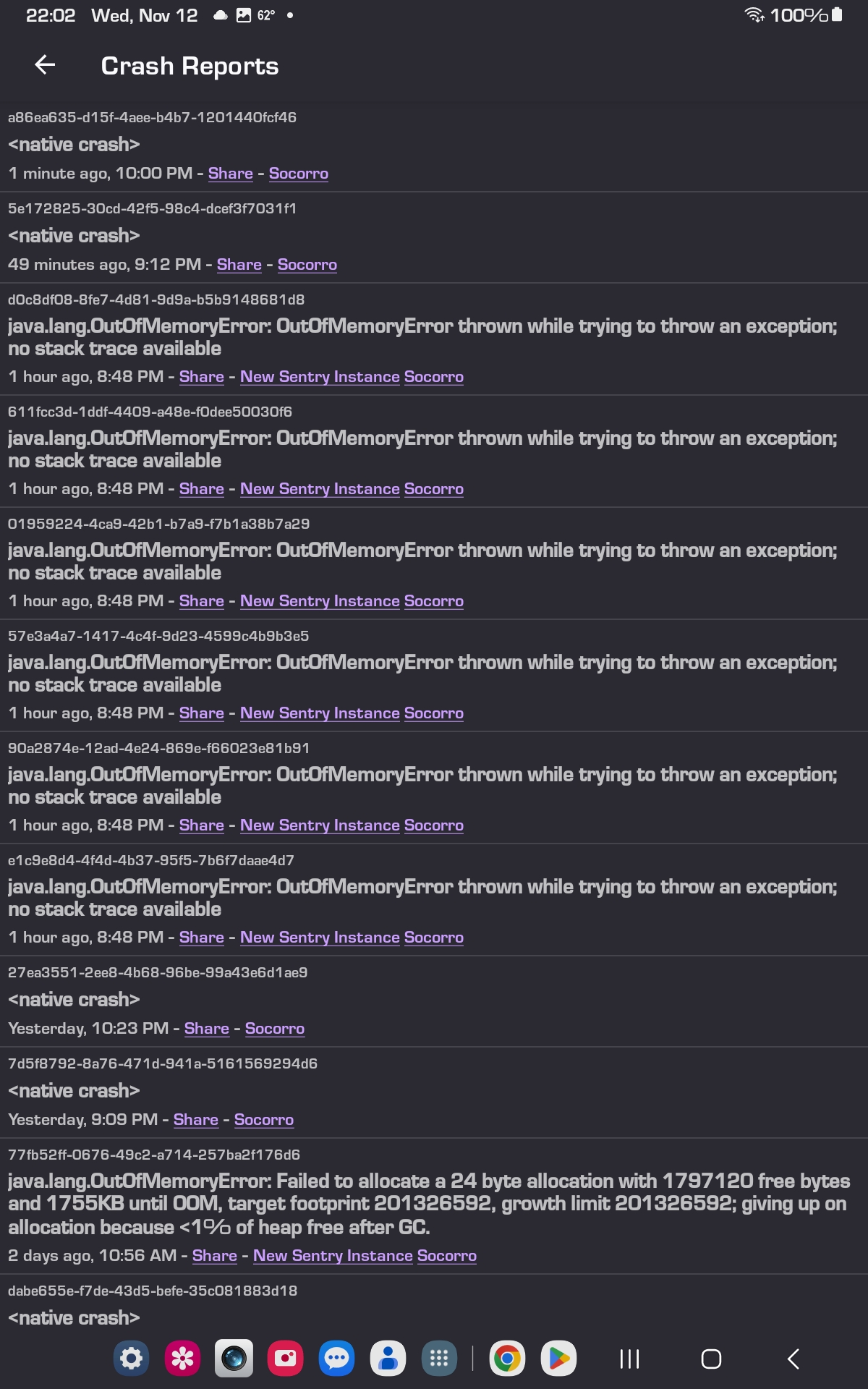

Additional ceash informati9n at: https://crash-stats.mozilla.org/report/index/6e9475fd-50b1-4b89-836c-382f40251113