


Thunderbird Headers taking too much space!

Headers are inconsequential, compared to the actual message content, I'm sure everybody will agree!
But on Thunderbird, recently, the headers take up almost HALF of the available space on the screen!
I have tried everything to reduce the message headers to ONE LINE (that is all it needs) but nothing works!!!
Have a look at FoxMail (screenshot below)! Compare it with how my Thunderbird looks (screenshot below)!
These are actual screenshots of what my entire screen looks like, with Thunderbird and FoxMail.
Foxmail has clean, simple, one line headers, with the message body taking up the maximum viewable space on the page! Thunderbird is almost 50% WASTED screen space!!!!
BTW the add-on / extension "Compact Headers" does not seem to work with the latest versions of Thunderbird.
Thank You!


글쓴이 Canada Sam 수정일시
선택된 해결법
Canada Sam said
Ok, that's great, it REALLY helps, now, how about making my list of messages on top of the message look like yours? List of messages, only one line per message, it takes up a LOT of space with my look, but yours, is PERFECT!!! See your screenshot below with the list of messages shown in a red box which I put.
I am sorry, I missed those lines. Actually you are using the new "Cards" view for the thread pane and I still use the historic "Table" view for working . You can toggle between those thread pane views after clicking on the button on the right of the "Quick Filter" button (see picture) and selecting ✔︎ Table View in the drop-down menu
문맥에 따라 이 답변을 읽어주세요 👍 2모든 댓글 (9)
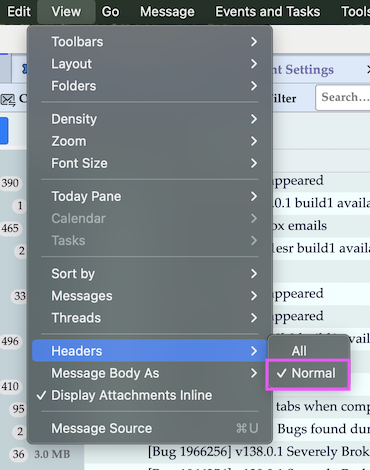
The extension "CompactHeaders" works for me in Thunderbird versions 128 and 138 in Table view as well as Cards view (picture). Also take care to check "Normal" in View > Headers (and not "All")

Mapenzi, THANK YOU VERY MUCH for trying to help me, I have checked NORMAL in View, and also have SINGLE LINE HEADERS checked, but as you can see by the screenshot, the headers are still much too big, and not single line.
Any other ideas?
Thanks Again!

My dear friend,
didn't you notice that ComapctHeaders puts a little downward arrow symbol before "From" in the headers ? It's like a folder with subfolders in the folder pane: By clicking on the arrow you can expand or collapse the contents, so just right-click on the arrow and you will be happy!

글쓴이 Mapenzi 수정일시
Ok, that's great, it REALLY helps, now, how about making my list of messages on top of the message look like yours?
List of messages, only one line per message, it takes up a LOT of space with my look, but yours, is PERFECT!!!
See your screenshot below with the list of messages shown in a red box which I put.
And THANK YOU very kind person!!!!

Surely there is a way to thank someone here, for the kind help?
No "Thanks" button?
Use the "Helpful" button for the "good" proposal/solution and it will count as a solution for the author
Ooops, so sorry, I clicked the wrong one before, the THUMBS UP is the correct one, I will of-course, click all thumbs up for you, as soon as you give me a suggestion on how to make my top list of mails in one line, like yours is, friend!
선택된 해결법
Canada Sam said
Ok, that's great, it REALLY helps, now, how about making my list of messages on top of the message look like yours? List of messages, only one line per message, it takes up a LOT of space with my look, but yours, is PERFECT!!! See your screenshot below with the list of messages shown in a red box which I put.
I am sorry, I missed those lines. Actually you are using the new "Cards" view for the thread pane and I still use the historic "Table" view for working . You can toggle between those thread pane views after clicking on the button on the right of the "Quick Filter" button (see picture) and selecting ✔︎ Table View in the drop-down menu

Mapenzi, you Sir, are a GENIUS! Many, many thanks. All is now well in the world!