


account: IMAP does not work!?

hello
i want to install an account in my mozilla thunderbird
it's a BLUEWIN.CH email bluewin/swisscom is the biggest provider in switzerland
BUT
the IMAP are not accepted in my thunderbird?!?! imaps.bluewin.ch smtpauths.bluewin.ch
why please + thanks for your help!
모든 댓글 (6)
Please provide more information, such as screenshots of incoming server settings pane, plus full error message.
The problem might be that the password required for TB is not the same as the one used to log into webmail or the swisscom website. Some providers require a separate password to access mail accounts through 3rd-party apps like TB.
https://www.swisscom.ch/en/residential/help/e-mail/setup.html
thanks for your messsages
there is no need for a screenshot since it only says: imap are not accepted + password does not work
at swisscom, i'v got only one password for both the account AND the email
it still does not work: - is the problem at swisscom, with mozilla - is the problem at mozilla with the imap links ?
Please share more detail. I just created a test account there and was successful. Naturally, it failed on password, but the account is there and showing error message about imap.
> I just created a test account there and was successful
with bluewin?!
- * *
here are the screenshots (#2 then #1):
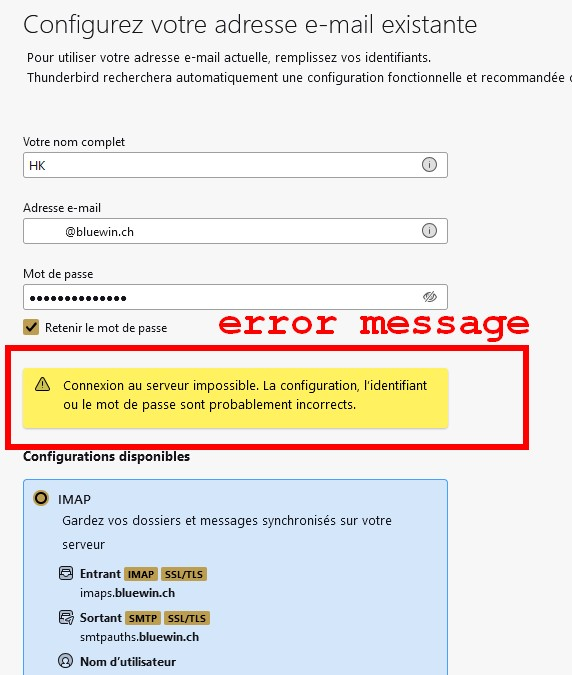
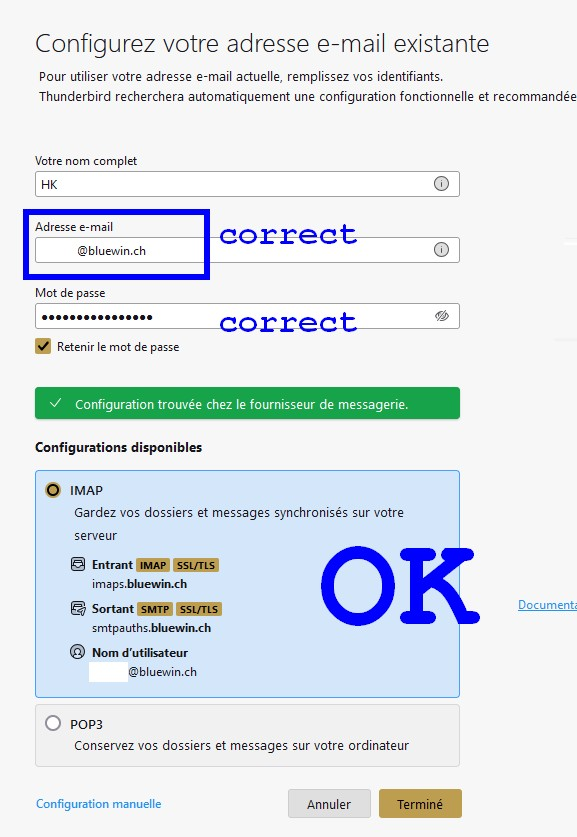
글쓴이 HK 수정일시
Do not include password there. All you want there is to validate the server setup. Wait until prompted for password.