Hi kimblewood, Firefox always had a sidebar, but it has a new design that expands from and collapses back to a button bar instead of hiding completely. If you want to hide it completely, that's a two-step process:
(1) Change the setting for what the Sidebars toolbar button does, and
(2) Click the Sidebars toolbar button to hide the sidebar
Sidebar Button Setting
Click the gear wheel at the bottom of the vertical button bar, then change the behavior of the button from expand/collapse to show/hide. I'm attaching a picture for reference:
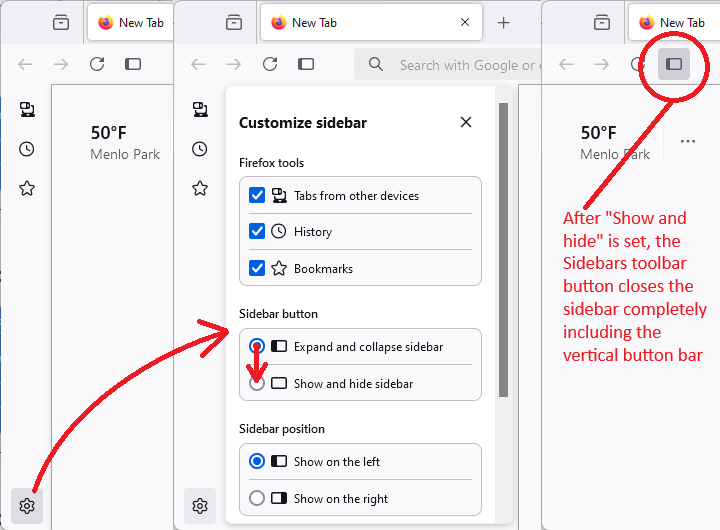
After you make that change, you can use the X to close the "Customize sidebar" panel.
Click the Sidebars button
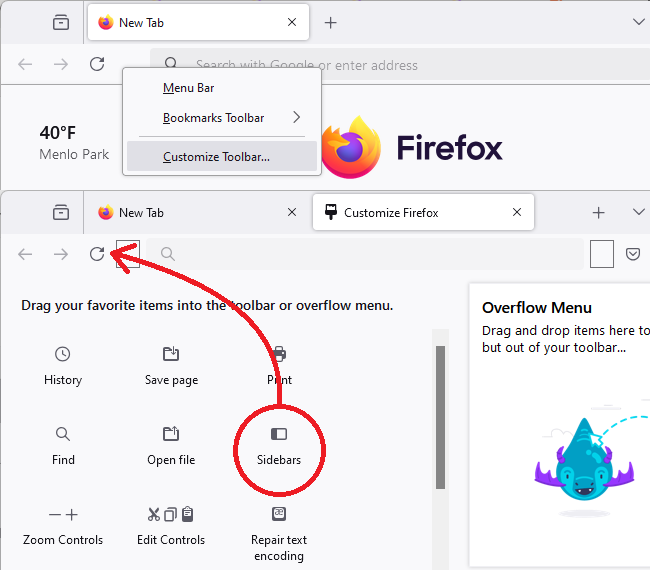
This button should be near the back/forward/reload buttons. If yours is missing, you can add it using the Customize feature (Customize Firefox controls, buttons and toolbars). I'm attaching a picture for reference:
Success?
Hi kimblewood, Firefox always had a sidebar, but it has a new design that expands from and collapses back to a button bar instead of hiding completely. If you want to hide it completely, that's a two-step process:
(1) Change the setting for what the Sidebars toolbar button does, and
(2) Click the Sidebars toolbar button to hide the sidebar
'''Sidebar Button Setting'''
Click the gear wheel at the bottom of the vertical button bar, then change the behavior of the button from expand/collapse to show/hide. I'm attaching a picture for reference:
<blockquote><img src="https://assets-prod.sumo.prod.webservices.mozgcp.net/media/uploads/images/2024-12-01-15-15-43-f06979.png"></blockquote>
After you make that change, you can use the X to close the "Customize sidebar" panel.
'''Click the Sidebars button'''
This button should be near the back/forward/reload buttons. If yours is missing, you can add it using the Customize feature ([[Customize Firefox controls, buttons and toolbars]]). I'm attaching a picture for reference:
<blockquote><img src="https://assets-prod.sumo.prod.webservices.mozgcp.net/media/uploads/images/2024-12-01-15-15-53-0faa2f.png"></blockquote>
Success?



