이 쓰레드는 보존되었습니다.
만약 도움이 필요하시면 새로운 질문을 올려주세요.

보존
what do you call the function when an email follows another in a string or cascade and how to get rid of it

what do you call the function when an email follows another in a string or cascade and how to get rid of it
what do you call the function when an email follows another in a string or cascade and how to get rid of it
모든 댓글 (1)
I think you mean Threading.
Firstly press Alt-v and click "Sort by" on the drop-down menu that appears. Towards the bottom of that are "Threaded" and "Unthreaded." Click "Unthreaded."
That will sort out the folder you are currently displaying but only that one.
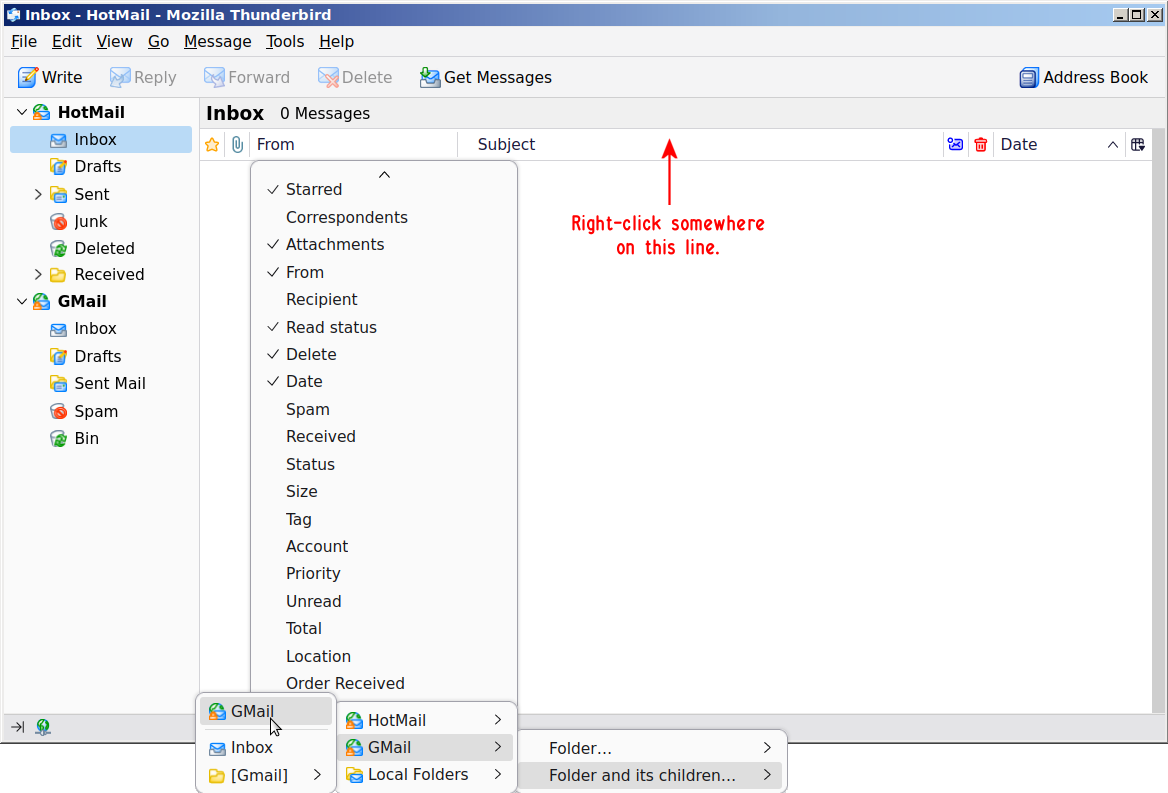
To make it work in every folder right-click somewhere on the line with the column headings and choose "Apply current view to folder and its children" at the bottom, then pick one of your accounts, then the top of the next list that comes up. See picture as hopefully that'll make it clearer.
You have to do it for every account you have.