


Thunderbird email not working properly

I am an older user, 83, with a severe hearing impairment and depend on email for communication. I don't know how Mozilla and Thunderbird are related. Midco is my internet provider For the past few months I have had some of the following problems. Currently Email is very slow to get started nothing on the screen except the upper bar with File, Edit, View, etc. below is another small bar with little boxes which need to be scrolled to the right to get "inbox" for messages if I access a message, I need to scroll all of those little boxes to the right again to get in box. It is quite time consuming and not like it used to be.
In the past new messages have been highlighted, now some are and some not and some embedded in an older message from that sender. i was gone for a week and usually have a number of messages to read, this last time away none of the messages sent while I was away appeared. I have several daily subscriptions which didn't show up highlighted like they used to. I made a $100 donation to Thunderbird at the beginning of the year hoping that would make the service better.
I am trying mozilla support for help. I do need email. Someone suggested I try Midco our internet provider or having a computer expert check this out on my computer
Thank you.
Vicki Douglas
모든 댓글 (1)
ok, I am going to be blunt. I think you have the horse by the left rear hoof and while that can work for shoeing, you are struggling to mount the beast.
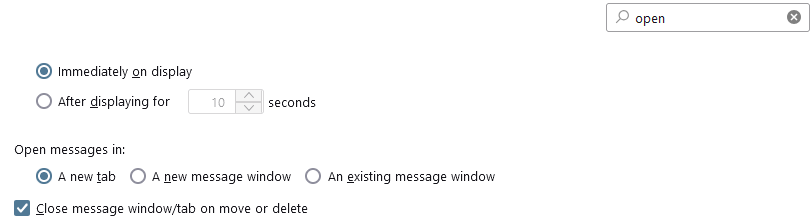
Thunderbird's user interface is a tabbed affair and from your description I think you have many, many tabs open (little boxes which need to be scrolled to the right to get "inbox") each of those tabs represents an open email. If you click on one of them you will see an email you have read in the past. When you are on the "inbox" right click on the little box and select close all other tabs from the menu.
Personally I do not double click on most of my emails (which opens a tab for that email) I use the reading pane (f8) and only use the main page with the inbox to read my mail which I set Thunderbird to display on the bottom half of the screen. When I do need to have the email in full screen size, I choose to use a new window for that email. This is set in Tools > settings on the menu. (search for open and then scroll to the image below.
 Some time ago (years really) Thunderbird had it's default way of showing mail changed to what is referred to threaded view, which is a special sort of the list of emails in the inbox. See https://support.mozilla.org/en-US/kb/message-threading-thunderbird#
I think this is what you are referring to when you say "In the past new messages have been highlighted, now some are and some not and some embedded in an older message from that sender. "
On the top menu there is View > Sort by. Select the sort by option and change threaded to unthreaded