Downloading attachment in Outlook doesn't ask me where to store it
Regular download works fine, but when I try to download attachment in outlook.live.com website, it didn't ask me where to store it, but simply places it in my default location, while at the same time opening the attachment even though I only want to download the file.
Regular download works fine, but when I try to download attachment in outlook.live.com website, it didn't ask me where to store it, but simply places it in my default location, while at the same time opening the attachment even though I only want to download the file.
선택된 해결법
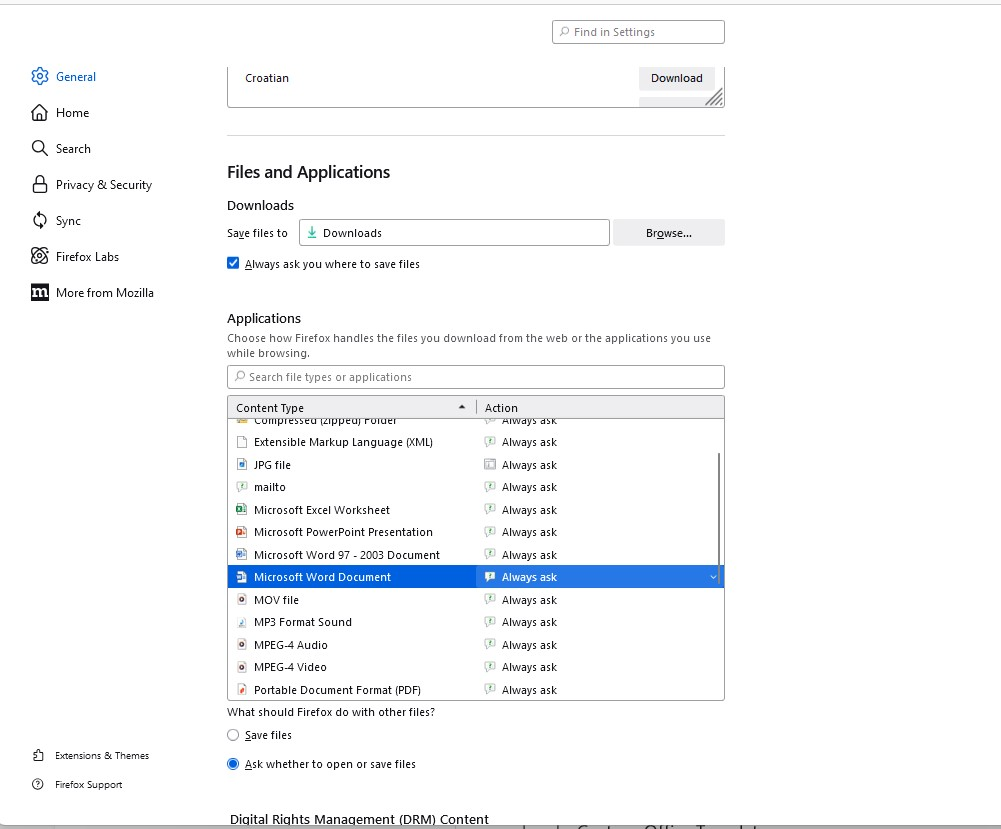
Never mind, I know why this happens now. Default action in Applications section was set to Open in Firefox instead of Save File. This is resolved now.
문맥에 따라 이 답변을 읽어주세요 👍 0모든 댓글 (3)
선택된 해결법
Never mind, I know why this happens now. Default action in Applications section was set to Open in Firefox instead of Save File. This is resolved now.
글쓴이 WaReMoN 수정일시
You need to mark it resolved.

I have the SAME problem - and I have EVERYTHING set to ALWAYS ASK - (See Screen grab) - it just doesn't work!