


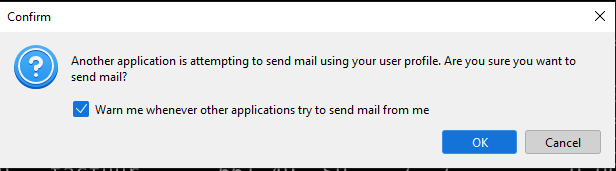
Another application is attempting to send mail using your user profile.

Hello;
Using Thunderbird v115.10.1 (64-bit) on Windows 10 PRO.
Once a month or so, I need to send some emails from another application. Keep getting the warning about "Another application is attempting to send mail using your user profile" (image attached).
OK... a very good warning.
But... I don't want to have to click <OK> every time an email is sent.
So... I unchecked the checkbox.
Warning gone... works great.
Now... I want to re-enable that warning in case a rogue application tries to send an email.
Have looked, and looked, and looked under \Tools\Settings and \Tools\AccountSettings.
Can not find how to re-enable this (if it's there I am looking right at it and not seeing it).
Can anyone help?
Also used regedit to search the Windows registry, but could not find it.
Also... is there a way to change settings from a CLI (would be nice to disable this warning, send the emails, then re-enable is all programmatically.
TIA.
Bo...
모든 댓글 (3)
Just a possibility.... - click settings>general and scroll down to config editor at bottom of pane and open it - look for 'mapi.blind-send.enabled. If it is set to false, change it to true.
Hi David;
The actual setting I needed to change was mapi.blind-send.warn.
Unchecking the checkbox in the warning message disables the warning for future emails.
Changing the value back to true re-enabled the warning message.
Do you know how to change this setting programmatically?
Thanks again.
Bo.
That is how it's done, by editing config editor.