


MS mails (hotmail & outlook) to gmail accounts are bounced error 550-5.7.26

MS mails (hotmail & outlook) to gmail accounts are bounced error 550-5.7.26
With Outlook mail client it goes well, but via Thunderbird it is not working since some time. Maybe since I switched from Avast to MS Defender?
선택된 해결법
Remove the entries in Saved Passwords in Settings/Privacy & Security, and in the same section check that cookies are accepted, restart TB, enter the account password in the OAuth window. Also check that incoming settings are: outlook.office365.com, 993 (IMAP) or 995 (POP), SSL/TLS, OAuth2, User Name = email address.
모든 댓글 (7)
What are the settings for the hotmail/outlook accounts? Are you using a VPN?
https://support.mozilla.org/en-US/questions/1417298#answer-1588949
I am not using VPN.
Settings are: Servernaam: smtp-mail.outlook.com Poort: 587 Authenticatiemethode: Normaal wachtwoord Verbindingsbeveiliging: STARTTLS
Use the settings in the link in my first reply. The error refers to failed authentication.
Thanks for response, I know this. Strange thing is that for outlook I cannot select Oauth2 within the Thunderbird settings. However for Gmail I do can select Oath2
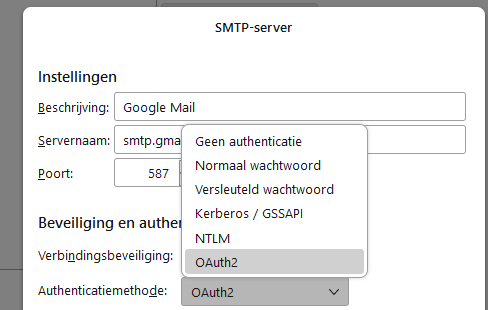
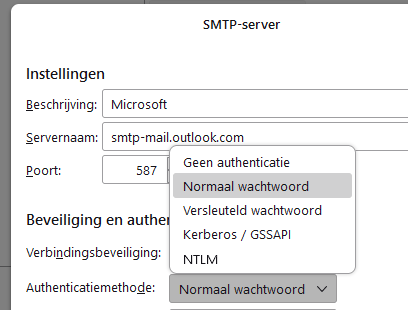
글쓴이 rvanderknaap 수정일시
With help of https://askubuntu.com/questions/1465261/missing-oauth2-authentication-option-thunderbird-102-10-0 i was able to add Oauth2. However still no improvements
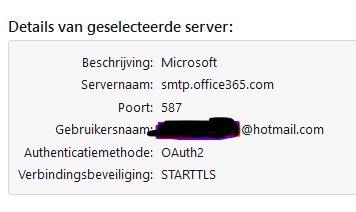
선택된 해결법
Remove the entries in Saved Passwords in Settings/Privacy & Security, and in the same section check that cookies are accepted, restart TB, enter the account password in the OAuth window. Also check that incoming settings are: outlook.office365.com, 993 (IMAP) or 995 (POP), SSL/TLS, OAuth2, User Name = email address.
Thanks for your help! It is now finally working again. Other setting I found, was that also at account settings, there is an option to select the right outgoing mail server (next to the outgoing mail server section below).
Still wondering what might have caused this issue.
글쓴이 rvanderknaap 수정일시