


Hiding number of messages under Message List Header (post thunderbird 115)

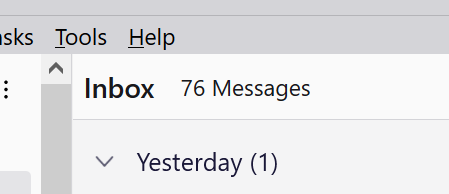
After installing Supernova update (love it to be honest), I started playing with the customisation settings. If I am not mistaken I found a way to hide the number of messages under the Message List Header section, but now I can't seem to find this option, can anyone point me to this?
Please see attachment or alternatively see link below, referring to #4 on this article screenshot. https://blog.thunderbird.net/2023/07/getting-started-with-the-main-window-of-thunderbird-115-supernova/
선택된 해결법
Use this css to hide the message count in the header:
#threadPaneFolderCount { display: none !important;}
Help/Troubleshooting Info, Profile Folder, Open Folder, close TB, create a new folder named chrome, create a new document in chrome with a text editor, name it userChrome.css, Save as type: All files *.*, copy in the above code. Double-click toolkit.legacyUserProfileCustomizations.stylesheets to true in Settings/General/Config. editor, restart TB.
모든 댓글 (4)
View/Layout/Message List Header.
sfhowes said
View/Layout/Message List Header.
That completely removes the message list header, which I prefer to keep as I use the quick filter. I'd like to remove just the number of messages.
선택된 해결법
Use this css to hide the message count in the header:
#threadPaneFolderCount { display: none !important;}
Help/Troubleshooting Info, Profile Folder, Open Folder, close TB, create a new folder named chrome, create a new document in chrome with a text editor, name it userChrome.css, Save as type: All files *.*, copy in the above code. Double-click toolkit.legacyUserProfileCustomizations.stylesheets to true in Settings/General/Config. editor, restart TB.
sfhowes said
Use this css to hide the message count in the header:#threadPaneFolderCount { display: none !important;}
Help/Troubleshooting Info, Profile Folder, Open Folder, close TB, create a new folder named chrome, create a new document in chrome with a text editor, name it userChrome.css, Save as type: All files *.*, copy in the above code. Double-click toolkit.legacyUserProfileCustomizations.stylesheets to true in Settings/General/Config. editor, restart TB.
Fantastic, that worked. Thank you.
Going to look for more useful CSS customizations as I never knew it was possible that way.