


Deleted emails do not appear in Trash folder

After accidentally ‘upgrading’ from Thunderbird v102 to Thunderbird v115, I have a couple of issues that I didn’t have with v102. Here’s the first. (I’m not sure if I’ve chosen the correct topic.)
Under Server Settings I have:
 ‘When I delete a message: Move it to this folder:
 Trash on Internode’.
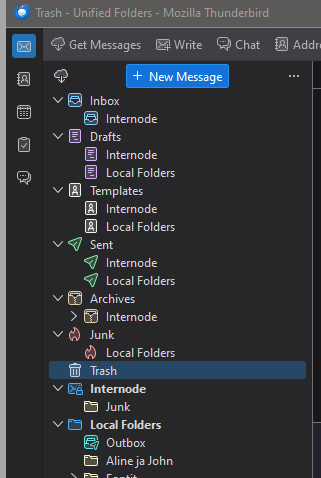
(Internode is my mail server.) This is unchanged from Thunderbird 102, but it no longer works as it should. I have a folder called ‘Trash’, but when I delete a message, it does not appear in that folder or any other, so I can’t recover or refer to deleted messages. In case it’s relevant, I’m attaching a screenshot of the ‘unified folders’ part of my folder tree with all folders opened. Some things there look odd to me. Drafts, Templates, Sent have subfolders (Internode, Local folders). Trash has none—is this connected with the problem? Junk is split in an odd way, but it seems to work as it should. Any help will be welcome.
선택된 해결법
Solution was found at https://support.mozilla.org/en-US/questions/1156586:
‘On the toolbar > Help > Troubleshooting Information -> Show Folder button to display the profile in explorer or finder. Close Thunderbird
‘open the mail folder Delete the folder smart mailboxes in the mail folder. Restart Thunderbird.
‘That will force the recreation of the whole unified folder settings.’
Trash folder now has subfolders ‘Internode’ and ‘Local Folders’. ‘Local Folders’ folder shows deleted messages.
문맥에 따라 이 답변을 읽어주세요 👍 0모든 댓글 (2)
선택된 해결법
Solution was found at https://support.mozilla.org/en-US/questions/1156586:
‘On the toolbar > Help > Troubleshooting Information -> Show Folder button to display the profile in explorer or finder. Close Thunderbird
‘open the mail folder Delete the folder smart mailboxes in the mail folder. Restart Thunderbird.
‘That will force the recreation of the whole unified folder settings.’
Trash folder now has subfolders ‘Internode’ and ‘Local Folders’. ‘Local Folders’ folder shows deleted messages.

The above solution is not applicable to my version of Thunderbird which is 102.11.0 running on Ubuntu 18.04. Under the Help menu, the options are:
   Troubleshooting Mode
   More Troubleshooting Information
Under More Troubleshooting Information there is no "Show Folder" button anywhere.
In my account settings, I have deleted mail sent to Trash folder in each of my accounts, but all deleted mail is automatically deleted instead.
My mail server is gmail using IMAP. When accessing gmail through my browser, all deleted mail is directed to the trash folder where I can recover it if deleted accidentally. But all deleted mail in TB is gone forever.