


Tabs and their shortcuts
Hi,
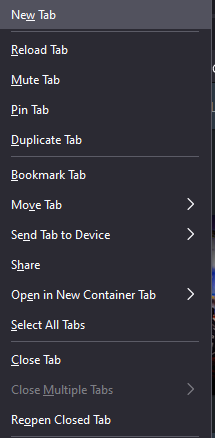
I have a problem connected with shortcuts on tabs in Mozilla Firefox. When I click a tab with right mouse click then I can for example close tab by just clicking W, or I can pin a tab using P. And it works great on Windows 10. But on my Macbook clicking buttons on keyboard does not do the required action, it just kind of hovers over the option i chose. I mean, when you look on the attached image you can see that for example in "New Tab" letter "w" in underscored (so I can click "w" and then the tab closes). Is there an easy fix for that?
Thanks
모든 댓글 (5)
On Windows, the letter won't immediately execute the menu item if two items have the same accelerator key. But it sounds like you see this too often for that to be the explanation.
Maybe this is a Mac OS setting you could modify??
Otherwise, perhaps you need to press Return to execute the highlighted item.
Yeah, on MacOS when I hit enter it works, but I want to be able to use shortcuts without pressing the enter :D
Does this pref has the default value ?
- about:config => accessibility.accesskeycausesactivation = true
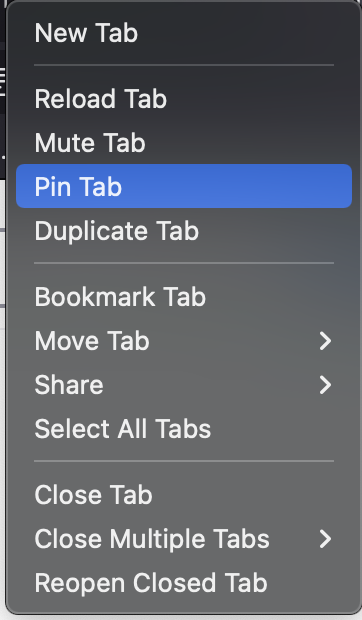
Yes, this pref has the default value ;d I attach screenshot to show you how does it look like on Mac.
글쓴이 lunesco 수정일시
I don't think that the keyboard shortcuts work on Mac like on Linux and Windows since they aren't displayed in the menu and the accelerate letters aren't underlined as well.