


The mail server responded: Syntax error - line too long -- when forwarding by a filter

We are just migrating to Thunderbird from Outlook, so quite new to Thunderbird... I have recreated an Outlook "rule", as a filter in TB to forward emails from a specific sender to a gmail address. The filter works fine on most of the mails, but fails on one with the error message:
"The mail server responded: Syntax error - line too long. "
However, the same mail can be forwarded from the inbox with a manual forward. What is the difference between the "Forward Message to" action in a filter -and- a right click and forward to the same mail item in the inbox? ...or does anyone have any other comments? The mail item that fails is an HTML mail of 178KB.
모든 댓글 (4)
Please post image of filter.
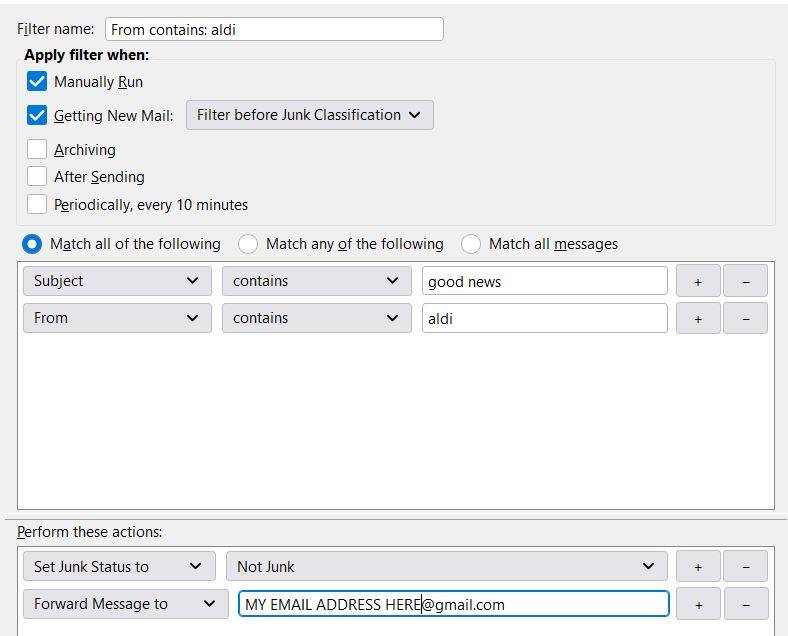
Hi, thanks for response and sorry for the delay - missed the notification. Here's the image. Bear in mind this filter works OK when initiated manually, but does work automatically. Though I am new to Thunderbird, all my other filters work OK...
The error basically means the message has more than the allowed number of consecutive characters in one line (ie, no line feeds) and the SMTP server or firewall / antispam filter bounced the message.
If you remove the 'Set Junk Status' condition, does it then auto work ?
The error basically means the message has more than the allowed number of consecutive characters in one line (ie, no line feeds) and the SMTP server or firewall / antispam filter bounced the message. ...yes, understood, that's the puzzle. The line is supposedly too long when auto-forwarded, but the line is not too long when the same message is manually forwarded. What I need to try and find out is the difference between the "Forward Message to" action in a filter -and- a right click and forward to the same mail item in the inbox.
I'll try the 'set junk status' but then I will need to wait until the next on-line shopping at Aldi. I could try and think of a way to set up a test case but my guess is that will work anyway.
This question has been locked because the original author has deleted their account. While you can no longer post new replies, the existing content remains available for reference.