


Content in iframes being downloaded instead of displayed

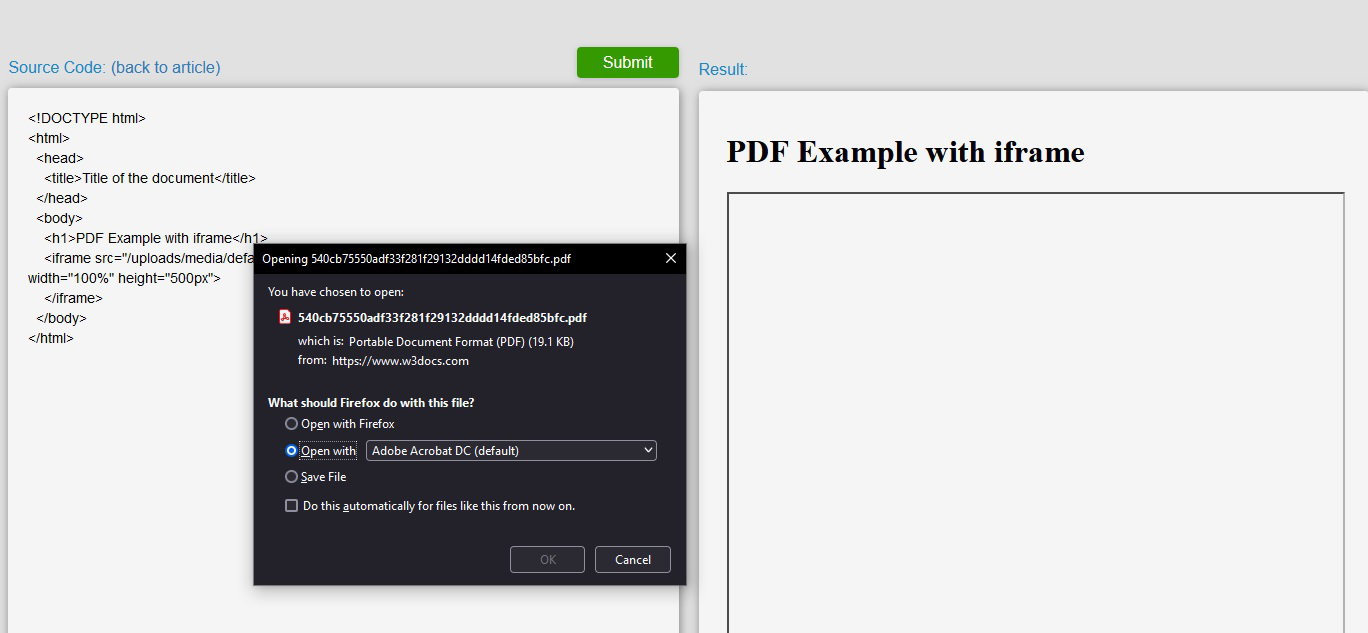
Today I visited a website that I often visit which uses pdfs embeded onto the page using <iframes> but instead of the embeded pdfs appearing on the page, I was prompted with the download pop-up asking if I would like to open or save the pdf. If I choose open in firefox, it opens in a new tab (basically acting as if I had clicked a download link) - this happens automatically when I visit the page.
This is an example of the type of page: https://www.w3docs.com/tools/code-editor/1085
When I go to this site I just see a black frame where the embed should be, and am prompted to download/open the pdf. (screenshot attached)
모든 댓글 (2)
It should work if Firefox has its default PDF handling setting of "Open in Firefox". This article describes where to check that: View and edit PDF files using Firefox’s built-in viewer.
If that choice is not available, or if PDFs save to the temp folder and open from there, here are a couple other things to check:
Built-in PDF Viewer disabled by preference?
(1) In a new tab, type or paste about:config in the address bar and press Enter/Return. Click the button accepting the risk.
More info on about:config: Configuration Editor for Firefox. The moderators would like us to remind you that changes made through this back door aren't fully supported and aren't guaranteed to continue working in the future.
(2) In the search box in the page, type or paste pdfjs.disabled and pause while the list is filtered
(3) If the pdfjs.disabled preference is bolded and has a value of true, double-click it to restore the default value of false
Built-in PDF Viewer disabled by policy?
This would be most relevant to a computer which is managed by an IT department.
In a new tab, type or paste about:policies in the address bar and press Enter/Return to load that page.
The normal thing to see here on the "Active" panel is "The Enterprise Policies service is inactive."
Do you have any policies listed here and, if so, do any of them refer to PDFs?
글쓴이 jscher2000 - Support Volunteer 수정일시
"Open in Firefox" did the trick - I wouldn't have thought it would be so simple;
Thanks for the help!