


Dark themes - menus don't display properly (dark text on dark background)

Using Firefox on Debian, on ChromeOS. Set the 'dark' theme or or the new Colorways themes when the background is dark.
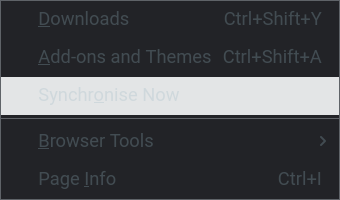
The menus (in the menu bar, context menus, and select drop-downs in web pages) display as dark text on a dark background, so they're barely legible. The highlighted menu item shows as light text on a light background. Attached an example showing the bookmark menu.
Has anyone got this? I raised a bug in bugzilla but it's been marked as 'not reproducible', but that was on Ubuntu: https://bugzilla.mozilla.org/show_bug.cgi?id=1725987
Using Firefox on Debian, on ChromeOS. Set the 'dark' theme or or the new Colorways themes when the background is dark.
The menus (in the menu bar, context menus, and select drop-downs in web pages) display as dark text on a dark background, so they're barely legible. The highlighted menu item shows as light text on a light background. Attached an example showing the bookmark menu.
Has anyone got this? I raised a bug in bugzilla but it's been marked as 'not reproducible', but that was on Ubuntu: https://bugzilla.mozilla.org/show_bug.cgi?id=1725987
모든 댓글 (1)
(the screenshot is the tools menu, not bookmarks)