


FF won't install Win 10 Home

Trying to download and install FF on new computer running Win 10 Home but get the following message. Tried twice with same result.
Trying to download and install FF on new computer running Win 10 Home but get the following message. Tried twice with same result.
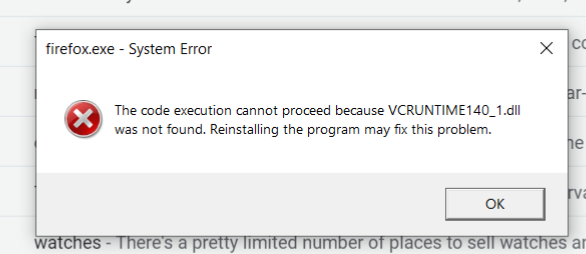
선택된 해결법
- Enter this link: https://support.microsoft.com/en-us/help/2977003/the-latest-supported-visual-c-downloads
- From the section Visual Studio 2015, 2017 and 2019 download the following executable file: vc_redist.x64.exe
- Install this file
- Restart the computer and run Firefox
모든 댓글 (1)
선택된 해결법
- Enter this link: https://support.microsoft.com/en-us/help/2977003/the-latest-supported-visual-c-downloads
- From the section Visual Studio 2015, 2017 and 2019 download the following executable file: vc_redist.x64.exe
- Install this file
- Restart the computer and run Firefox