


Incorrect fonts loading, or firefox can't render my systems fonts
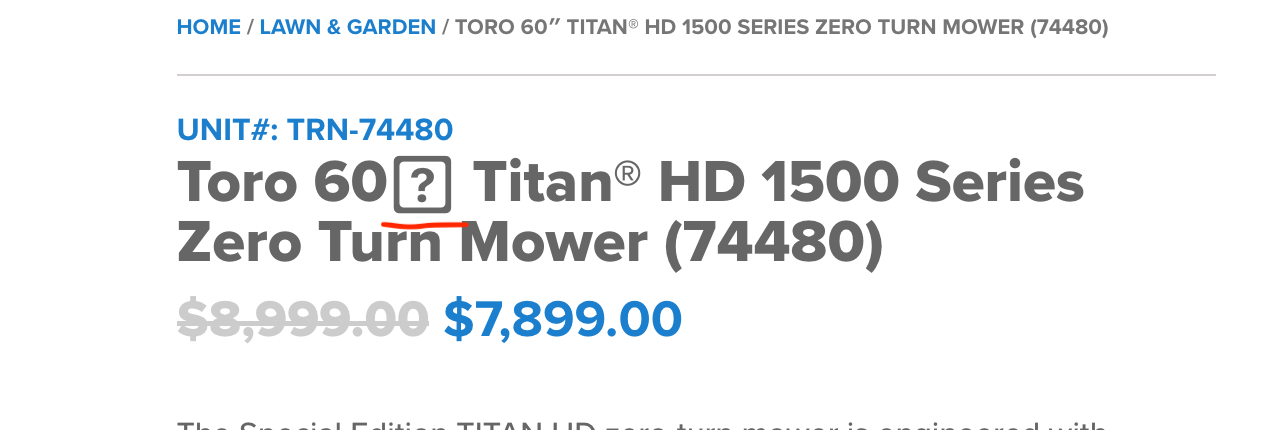
Take a look at the attachment, and you'll see a ? charactrer in the place of an " character. I see this happening with many different websites, but only in Firefox for some reason. Often times, firefox shows an entire block of text replaced with question marks, and then it snaps back with maybe just a few showing. I run Apple 10.15.6 Catalina. This may be a system issue on my end, but I was wondering if anyone has any clue as to why it does this, and how to correct it. Don't have this issue with any other browsers, and my firefoz is up to date, running 81.0 I think. Says it is up to date.
글쓴이 Scott Zosel 수정일시
모든 댓글 (1)
You can check what font Firefox is trying to use.
You can right-click and select "Inspect Element" to open the builtin Inspector with this element selected.
You can check in the Rules tab in the right panel in the Inspector what font-family is used for selected text. You can check in the Font tab in the right panel in the Inspector what font is actually used because Firefox might be using a different font than specified by the website.
See also:
- /questions/1292109 Fonts replaced with question marks in boxes