


facebook is telling me I'm not open in firefox
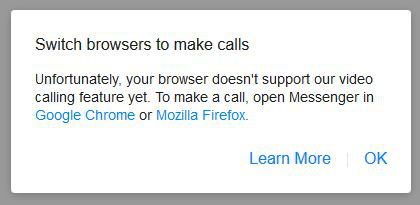
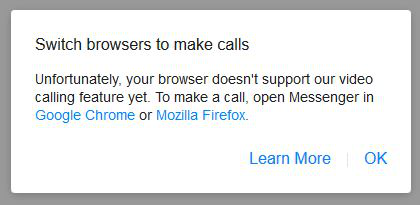
I've been trying to set up a camera for use in facebook messenger on my desktop. All the drivers etc are up to date. When I click on the video, facebook tells me that I need to use Chrome or Firefox to use the camera. Firefox is my default browser, any tab I open immediately opens with the Firefox logo.
모든 댓글 (3)
Hi jazeiler, does Firefox work with your camera on other sites? Here's a Mozilla Developer Network test page:
https://mdn-samples.mozilla.org/s/webrtc-capturestill/
Possibly useful: How to manage your camera and microphone permissions with Firefox
Yes it does.
What I did discover though was that I was getting an error message telling me that my browser was out of date & to use Chrome or Firefox - I already use the most up to date Firefox. Later I managed to accidentally discover a question somewhere in Facebook that had an answer that Facebook doesn't support Firefox to video in Messenger. So in one breath Facebook is saying "you aren't using Firefox & you must" (even though I was) & in the next is saying "we don't support Firefox to video in Messenger".
So, according to that, don't bother trying to video chat in Messenger if you're using Firefox.
Thanks for the other links though.

Hmm, one possible reason is if Messenger is running in a cross-site frame, the way Hangouts runs in Gmail. You can learn more about a frame, if it is one, by right-clicking a background area in the Messenger area and looking for "This Frame" on the context menu. If you find it, expand that sub-menu and try "Open Frame in New Tab" to relaunch the frame stand-alone. Then you can easily compare the address in the address bar to see whether it is on www.facebook.com or some other server.