


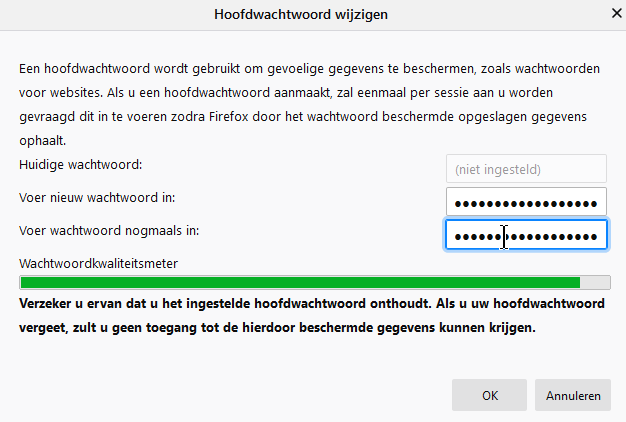
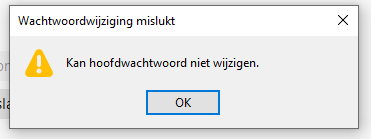
Cannor change master password as the current master password is not filled.
Cannor change master password as the current master password is not filled - refer to Firefox change master password.png and Firefox change master password 1.png for the error message
I'm using Firefox v75.0 6-bits. On Android all works well
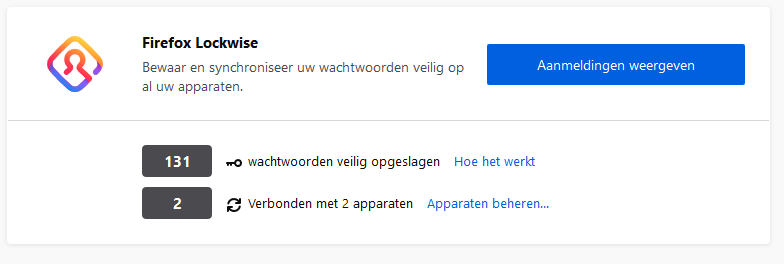
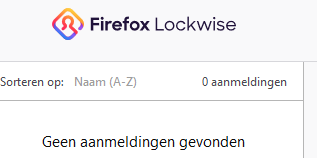
According to the privacy overview I have 131 logins, in Lockwise 0 (zero)
Can you help?
선택된 해결법
If the field of the current MP is empty then this normally means that there is currently no master password set.
The third screenshot would suggest that there are 131 logins stored in logins.json, but none are displayed in the forth screenshot. That could mean that there is a problem with the key file (key4.db) that prevents Firefox from decoding the logins.
With what Firefox version did this still work properly? Did you possibly used the refresh feature in Firefox to create a new profile?
Is there still a key3.db file in the profile folder ?
You can use the button on the "Help -> Troubleshooting Information" (about:support) page to go to the current Firefox profile folder or use the about:profiles page.
- Help -> Troubleshooting Information -> Profile Folder/Directory:
Windows: Open Folder; Linux: Open Directory; Mac: Show in Finder - https://support.mozilla.org/en-US/kb/profiles-where-firefox-stores-user-data
모든 댓글 (3)
It this your own computer or a computer that is managed by an IT department ?
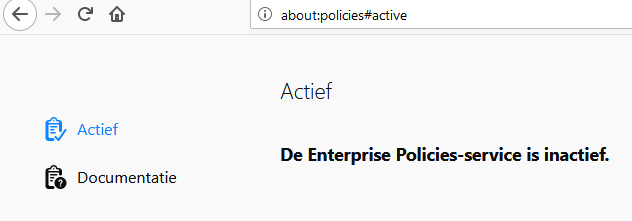
Are there policies active ?
In Firefox 63+ you can check the about:policies#active page to see whether policies are active. You can open about:policies via "Help -> Troubleshooting Information -> Application Basics -> Enterprise Policies" or via the location/address bar.
Enterprise policies are inactive, I'm using a private laptop
I appreciate your help
선택된 해결법
If the field of the current MP is empty then this normally means that there is currently no master password set.
The third screenshot would suggest that there are 131 logins stored in logins.json, but none are displayed in the forth screenshot. That could mean that there is a problem with the key file (key4.db) that prevents Firefox from decoding the logins.
With what Firefox version did this still work properly? Did you possibly used the refresh feature in Firefox to create a new profile?
Is there still a key3.db file in the profile folder ?
You can use the button on the "Help -> Troubleshooting Information" (about:support) page to go to the current Firefox profile folder or use the about:profiles page.
- Help -> Troubleshooting Information -> Profile Folder/Directory:
Windows: Open Folder; Linux: Open Directory; Mac: Show in Finder - https://support.mozilla.org/en-US/kb/profiles-where-firefox-stores-user-data