


Google Maps not able to Access Location
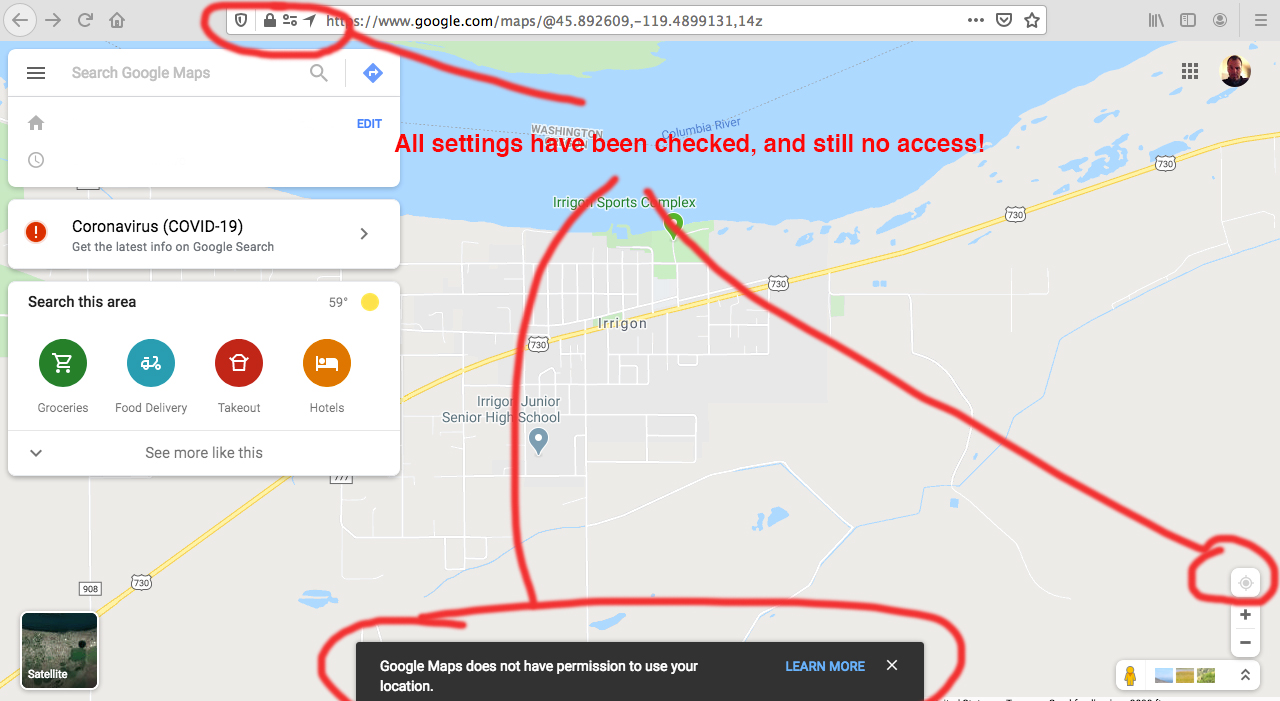
My google maps is unable to access my location even though I have allowed location access from Firefox preferences/settings. The blue target button (Current Location) on Google maps is greyed out, and when I hover over it it says that access is not allowed. Even though when I'm in google maps, the Address bar shows that my location access is allowed, as well as in the Firefox settings. I have refreshed the window multiple times, restarted Firefox, cleared all cookies, and restarted my computer. I've also toggled the enhanced tracking protection in the address bar to off, restarted the browser, still not working. Everything in the settings tells me that access is allowed, yet google maps still tells me that it is denied. Has anyone had this problem, or know of a workaround or how to fix this? Thanks! (Working on Firefox 75. with a MAC)
선택된 해결법
Figured it out! It was in my system preferences!
   Open System Preferences  Security & Privacy Preferences  Privacy  Location Services.
   To allow for changes, click the lock in the bottom left.
   Check "Enable Location Services."
Thanks again!
모든 댓글 (7)
hello, can you try to replicate this behaviour when you launch firefox in safe mode once? if not, maybe an addon is interfering here...
Troubleshoot extensions, themes and hardware acceleration issues to solve common Firefox problems
Hi, thanks for the reply. Just tried all that. Didn't work. Still not allowing me to access locations in google Maps. Here's a screen shot of what I see.
ok thanks, then some other thing to check would be when you enter 'about:config' into the address bar and search for preferences containing 'geo' is any of the search results shown in bold? if so reset those entries to their default value.
i know far too little about macos, but please also check if there are system-wide settings that could deny geolocation permissions in general or for particular apps...
Thanks again...I checked 'about:config' and saw some geo items, but don't feel confidant messing around with any of those settings. I don't know what the defaults are and don't want to really mess things up. I'm stumped. I also checked as many system prefs as I could and didn't see anything unusual.
선택된 해결법
Figured it out! It was in my system preferences!
   Open System Preferences  Security & Privacy Preferences  Privacy  Location Services.
   To allow for changes, click the lock in the bottom left.
   Check "Enable Location Services."
Thanks again!
oh, good find - thanks for reporting back!
I don't have that option....ugh!!!