


my computer died but the ssd survived....how can I transfer bookmarld to a new computer?

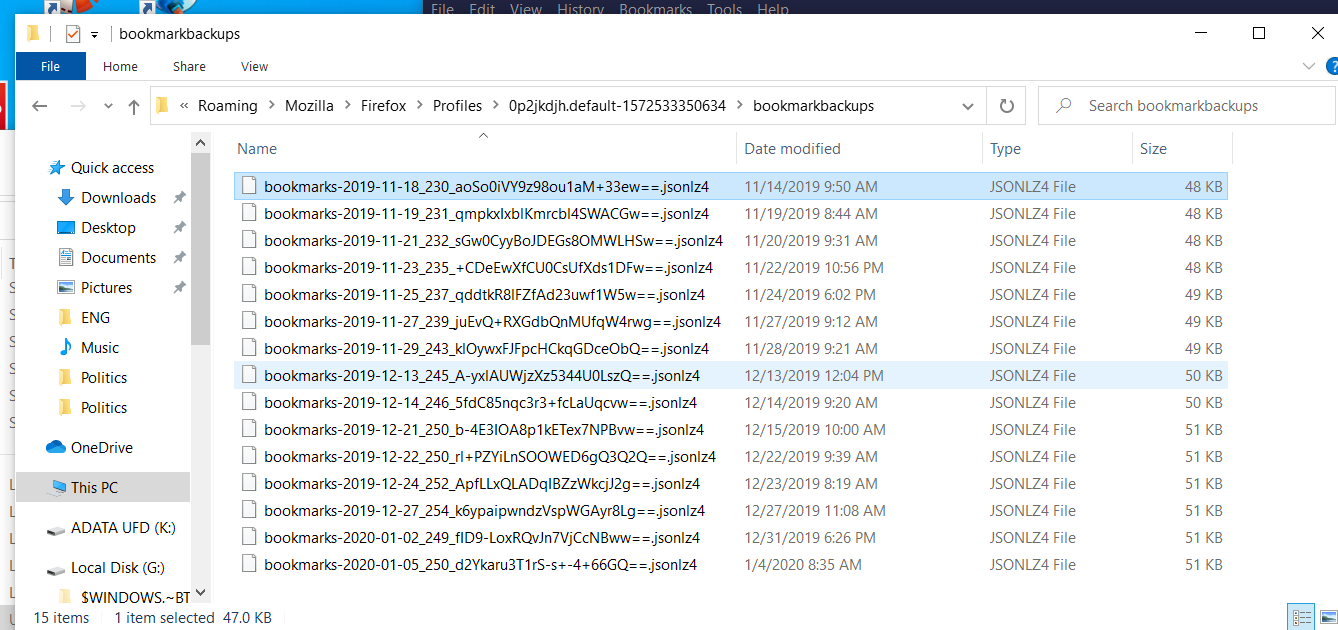
I removed my ssd from my Win 7 pro computer and inserted it into an external case. If I plug it into my new Win 10 computer, I can see all my Firefox files - including bookmarks folders - see attached. But the files are all in JSONLZ4 files. I'm now lost. Can anyone tell be how to load these onto my new Win 10 computer?
선택된 해결법
It looks like the Restore bookmarks from backup or move them to another computer page is what you are looking for. You need to copy the most recent backup file from your old drive and then open it in the Firefox bookmark manager.
Hope this helps.
문맥에 따라 이 답변을 읽어주세요 👍 1모든 댓글 (3)
선택된 해결법
It looks like the Restore bookmarks from backup or move them to another computer page is what you are looking for. You need to copy the most recent backup file from your old drive and then open it in the Firefox bookmark manager.
Hope this helps.
WOW!!! problem solved!! thanks so much for your help
Note that you can restore more personal data. See:
You can copy files like these with Firefox closed to the current profile folder to recover specific data.
- bookmarks and history: places.sqlite
- bookmark backups: compressed .jsonlz4 JSON backups in the bookmarkbackups folder
- cookies.sqlite for the Cookies
- formhistory.sqlite for saved autocomplete Form Data
- logins.json (passwords) and key4.db (58+) or key3.db (57 and older) (decryption key) for Passwords saved in the Password Manager
if you only have key3.db then make sure to remove an existing key4.db - cert9.db (58+) or cert8.db (57 and older) for (intermediate) certificates stored in the Certificate Manager
if you only have cert8.db then make sure to remove an existing cert9.db - persdict.dat for words you added to the spelling checker dictionary
- permissions.sqlite for Permissions and possibly content-prefs.sqlite for other website specific data (Site Preferences)
- sessionstore.jsonlz4 for open tabs and pinned tabs (see also the sessionstore-backups folder)