

이 쓰레드는 보존되었습니다.
만약 도움이 필요하시면 새로운 질문을 올려주세요.

보존
Default text filter for importing address book in Windows is missing an * I think
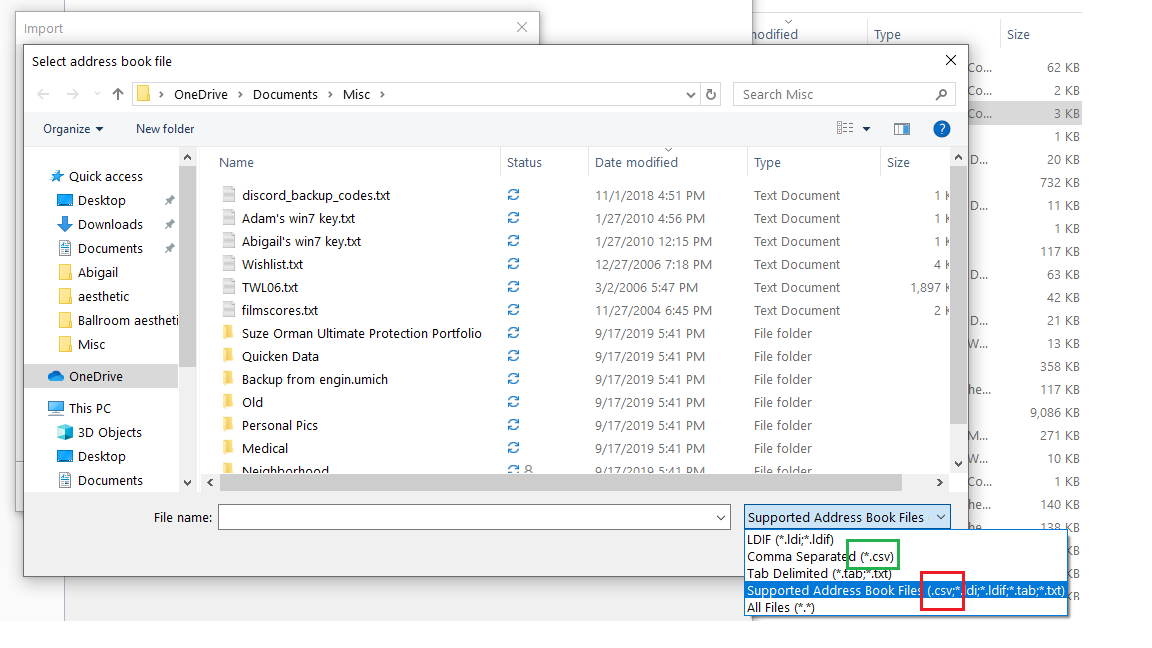
When I try to import an address book in Windows 10 Thunderbird, I pick the format list that includes csv, which is the format I have, but I don't see any .csv files. When I click on the format and change from the list to *.csv specifically, then my csv files show up. The list supposedly includes csv, so is it possible that the missing * in the filter string list is the problem? (See screenshot.)
When I try to import an address book in Windows 10 Thunderbird, I pick the format list that includes csv, which is the format I have, but I don't see any .csv files. When I click on the format and change from the list to *.csv specifically, then my csv files show up. The list supposedly includes csv, so is it possible that the missing * in the filter string list is the problem? (See screenshot.)
모든 댓글 (2)
It's definitely a bug. There are other issues with csv importing discussed here:
Thanks. Yeah, I also noticed that sometimes all the fields were unchecked and other times they weren't. But this seems like something easy to fix, I hope.