


Can't import MBOX files

I installed Thunderbird specifically to import/read MBOX files downloded from Gmail. I installed the add-on (ImportExport Tools NG). When I navigate to Tools / ImportExport Tools NG / Import mbox file, nothing happens. According to other websites, Thunderbird should open another dialog box at that point with several options, but I get nothin'. Any suggestions?
선택된 해결법
If you first select Local Folders in the Folder Pane, then Tools / ImportExport Tools NG / Import mbox file, do you see the window as in the attached picture? This is working in TB 60.8/W10.
문맥에 따라 이 답변을 읽어주세요 👍 1모든 댓글 (13)
선택된 해결법
If you first select Local Folders in the Folder Pane, then Tools / ImportExport Tools NG / Import mbox file, do you see the window as in the attached picture? This is working in TB 60.8/W10.
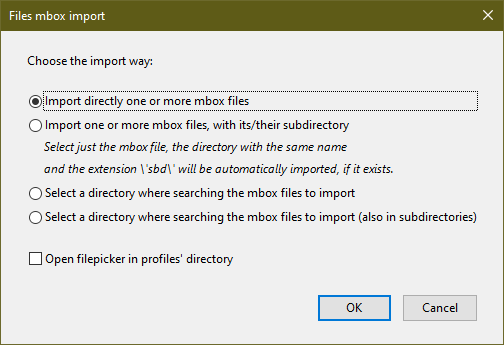
Somehow the Local Folders selection made the difference . . . I got the dialog box shown (wasn't getting it yesterday), and now I have a boatload of old messages dating back to '08! Thank you!
I loaded the addon, but even after clicking local folders I do not see that window as shown above
mwunsch995 said
I loaded the addon, but even after clicking local folders I do not see that window as shown above
Right-click Local Folders, then select ImportExportTools NG/Import mbox file.
Hi, I can't even find the Local Folders in the Folders pane.
I get a list of Unread, Favorite, Unfiled, that's it. I'm trying to read mbox files from Yahoo Groups that I downloaded from Yahoo. Thank you for any help.
JS3K said
Hi, I can't even find the Local Folders in the Folders pane. I get a list of Unread, Favorite, Unfiled, that's it. I'm trying to read mbox files from Yahoo Groups that I downloaded from Yahoo. Thank you for any help.
Local Folders is present in every TB setup, even if you haven't added any accounts. Select View/Folders/All; press Alt if the Menu Bar with View is hidden.
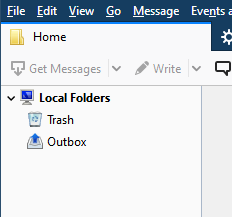
Hi, thank you. This is all I see:


Did you once have accounts in TB and folders visible in the Folder Pane, but after a crash or update TB started as if it were a new installation?
Hi, no, this was a fresh install.
Thank you for your interaction.
With a new installation, the Folder Pane should look like the attached picture, before adding any accounts. I don't know why yours is empty, so I suggest you create a new profile from Help/Troubleshooting Information, click about:profiles, then click Create a New Profile at the upper left .
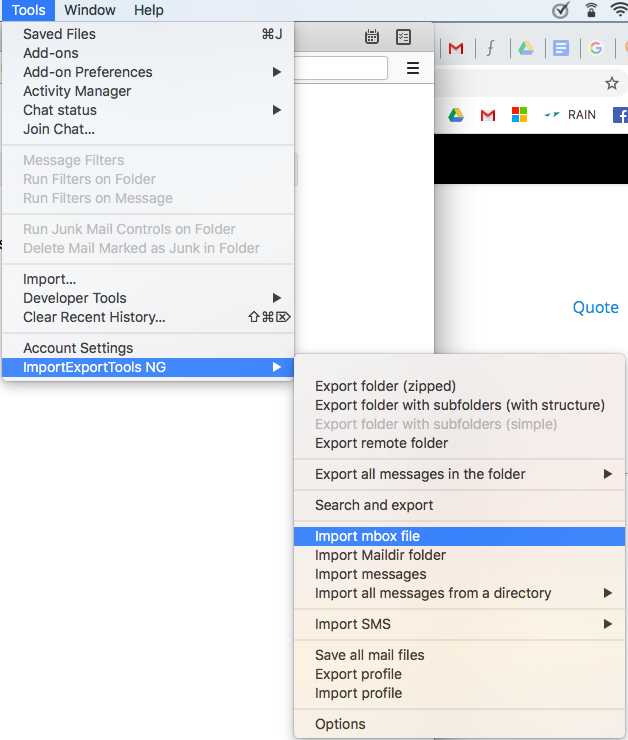
I'm also failing to get the expected sub-menu at Tools > ImportExportToolsNG > import mbox file > ??
I can't see Local Folders either ... is this because I'm on a Mac? If so, any suggestions?? Nothing logical seems to be working. Thanks
bdev said
I'm also failing to get the expected sub-menu at Tools > ImportExportToolsNG > import mbox file > ?? I can't see Local Folders either ... is this because I'm on a Mac? If so, any suggestions?? Nothing logical seems to be working. Thanks
Do you see the Folder Pane with a list of the account folders, Inbox, Sent etc., and Local Folders? If not, select View/Layout/Folder Pane, of click the 3-bar icon, Options/Layout/Folder Pane.
When you select Tools/IET NG/Import mbox file, the window in the picture attached to my first reply should appear.
So I discovered the cause of my error - I hadn't set up an email account in TB so couldn't see the Local Folders. As soon as I did I was able to follow the guidance in this thread and ... bingo!!. That only took me three months to resolve. Thanks all