Windows 10 reached EOS (end of support) on October 14, 2025. If you are on Windows 10, see this article.

Mozilla 도움말 검색

고객 지원 사기를 피하세요. 저희는 여러분께 절대로 전화를 걸거나 문자를 보내거나 개인 정보를 공유하도록 요청하지 않습니다. "악용 사례 신고"옵션을 사용하여 의심스러운 활동을 신고해 주세요.

자세히 살펴보기
보존

Dragging emails or attachments to desktop or other location no longer working in latest Beta

Rofre007

Hi there,

I've started using Thunderbird a month ago to replace Outlook. All seems to evolve well for this application, with just a couple of bugs to solve as far as I could experience. I'm on Windows 10 Pro latest version, clearly on a pc, not a mac...

1. With the new Beta installed yesterday, I can't drag emails or attachments to my desktop or other location on my disk... When dragging and releasing an email or attachment, it looks like it is indeed taking the file, but upon releasing, nothing happens...

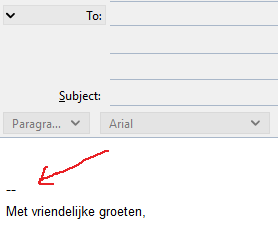
2. In previous Betas and this newest one too, I always get two hypens automatically placed in front of my signature when I create a new message... It's not something that is in my signature, and when Replying to a message, those hyphens are not inserted, so I'm certain this is a but somewhere. It happens with any of the signatures I use. Attached is a screenshot of how that looks.

3. I have downloaded and installad three extra dictonnaries, but none of them are available when I check the Options > Spelling > Language drop down... This was a problem in previous betas too, I never had this working since I became a Thunderbird user last month, and it very critical this works since I'm in Europe...

Will be glad to further help with getting the best mail app out there.

Frederic

Hi there, I've started using Thunderbird a month ago to replace Outlook. All seems to evolve well for this application, with just a couple of bugs to solve as far as I could experience. I'm on Windows 10 Pro latest version, clearly on a pc, not a mac... 1. With the new Beta installed yesterday, I can't drag emails or attachments to my desktop or other location on my disk... When dragging and releasing an email or attachment, it looks like it is indeed taking the file, but upon releasing, nothing happens... 2. In previous Betas and this newest one too, I always get two hypens automatically placed in front of my signature when I create a new message... It's not something that is in my signature, and when Replying to a message, those hyphens are not inserted, so I'm certain this is a but somewhere. It happens with any of the signatures I use. Attached is a screenshot of how that looks. 3. I have downloaded and installad three extra dictonnaries, but none of them are available when I check the Options > Spelling > Language drop down... This was a problem in previous betas too, I never had this working since I became a Thunderbird user last month, and it very critical this works since I'm in Europe... Will be glad to further help with getting the best mail app out there. Frederic

모든 댓글 (1)

See attachment for screenshot of those annoying two hyphens.