


.csv format headache import and export

I am trying to import about 700 contacts into Tbird. I have tried saving them in various formats and from various sources including my 'phone, windows contacts and outlook online. The format of these files never fits the address book correctly. Sometimes emails appear in name and other data ends up in the wrong columns of the address book.
I have tried formating the latest .csv file into the same columns as they appear in Tbird, but when they are imported the data is all over the place.
As a test, I deleted all the badly imported contacts, entered one contact - with details across several tabs, exported it, added a space in one field and then re-imported it. All the data is in the wrong column - again! Data is also completely mixed up when viewing it in the contact pane.
This reminds me of the early days of translation programmes, when they would fail to translate from one language, to another and then back again to the first.
I cannot find anyway to import the data into the correct column, and I've started to tear out what little hair I have left on my head, so any solutions would be most appreciated.
Thanks.
모든 댓글 (3)
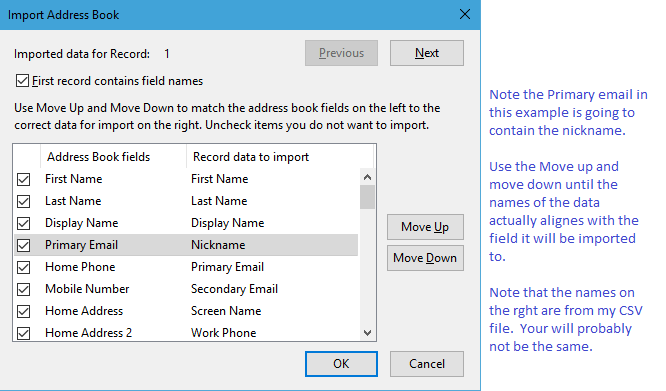
Did you align the fields when you imported them?
it is a cramped and fiddly window, but unless you have already got all the fields aligned then it will not work out

Just been bumped off . . .
. . . I just tried to say . . .
Thanks to both Matt and sfhowes for your replies.
I'll give each of them a try a try. Both make sense and I'll let you know how I get on. Thanks for your time.
Thanks again for your help.
I was so frustrated I couldn't see the fields for the data.
Kind regards
Josh