


Firefox v.58.0 blocks all websites. It's time to go back to the Internet Explorer.

Doesn't matter which website, I can't open any o them with the newest version (58.0). I am permanently getting the following warning: "Your connection is not secure" with the error code: "Error code: SEC_ERROR_UNKNOWN_ISSUER". Even to log to your website I had to use the Internet Explorer. What a shame.
선택된 해결법
I suspect Kaspersky is the problem here not FF since it worked in previous version. I use Defender and Windows Firewall and have no such problems as your describing.
글쓴이 WestEnd 수정일시
모든 댓글 (6)
hi, please give us more information about the error by clicking on the error code, copying the text to the clipboard and then pasting it here into a reply in the forum as shown in the screenshot.
thank you!
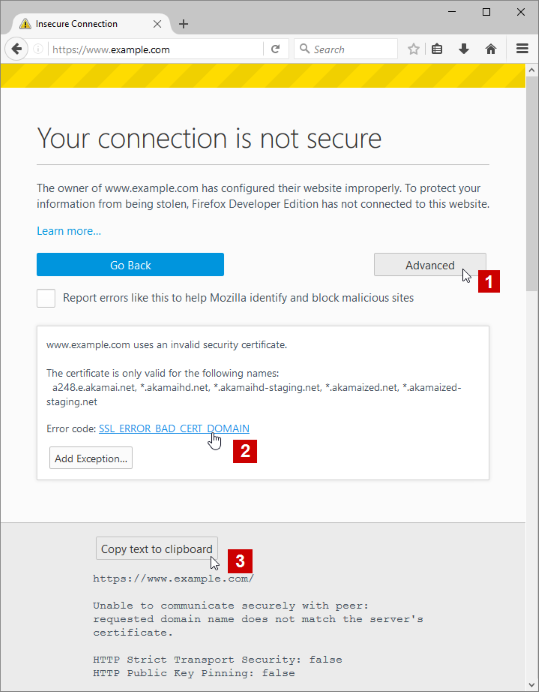
Well, below is a response to the weather network web site. The same applies to every of my old and new attempts to open some web page. To be clear, I didn’t touch any setting (like virus protection program – Kaspersky). Firefox has been working perfectly for years. Yesterday I turned off my computer at noon and then turned it on 3 hours later. I tried to open Firefox but immediately I got that “updating message” and few seconds later, when Firefox launched, it couldn’t open my home web page. Again, I haven’t touch any settings on my computer. Any change came with your update. But now even the previous version (57.4) doesn’t work.
Regards, Peter
Here is the copied clipboard:
https://www.theweathernetwork.com/weather/canada/ontario/ottawa/k1v9p6/E1786210
Peer’s Certificate issuer is not recognized.
HTTP Strict Transport Security: false HTTP Public Key Pinning: false
Certificate chain:
ok, then please try to set-up kasperksy as it's described in Troubleshoot security error codes on secure websites
Yes, when I disabled the scanning encrypted connections it started to work. Before Kaspersky scanned encrypted connections upon request from protection components. But it worked with all previous Firefox versions!! So, why are you introducing such changes?
선택된 해결법
I suspect Kaspersky is the problem here not FF since it worked in previous version. I use Defender and Windows Firewall and have no such problems as your describing.
글쓴이 WestEnd 수정일시
See also:
- bug 1433065 - Firefox 58 is not loading any pages (including about: pages)
(please do not comment in bug reports
https://bugzilla.mozilla.org/page.cgi?id=etiquette.html)