


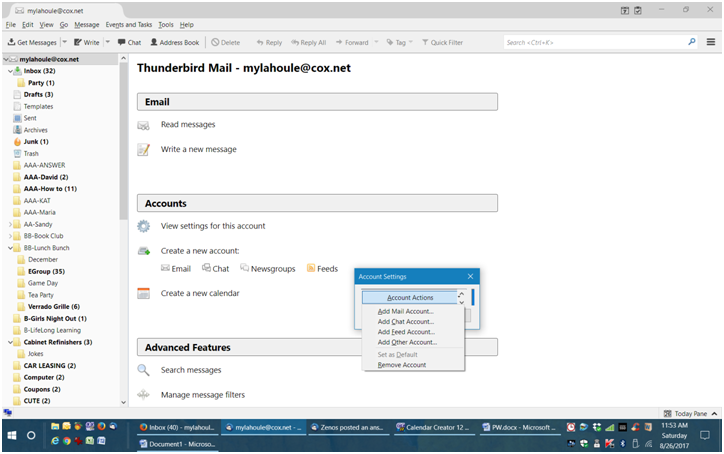
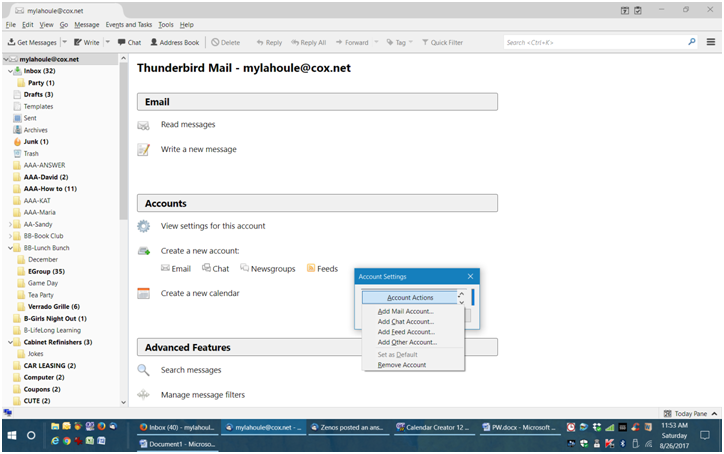
I'm trying to add a signature to an email, but when I click on Account Settings, all I get is a small "Account Settings" box

When I click View Settings for this account, it does not show the settings. All I get is a small Account Settings box, with Account Actions, which gives me the options of: Add Mail Account, Chat Account, Feed Account of Remove Account
선택된 해결법
Can you not grab a corner of the Account Settings pane and stretch it to a larger size?
I think adding a signature is the least of your problems right now. In this state you can't do anything with any of your account settings. :-(
My own settings panel gave me a problem in that it was taller than my display and I couldn't get at the "OK" button at the bottom. A helpful add-on author helped me with a setting for the height of the box, and so from this I learnt that the height and width of this and other dialogues is hard coded. So it's a bit of a puzzle as to how your settings have changed to this unhelpful size.
The solution for my problem was to add this code, below, to my userChrome.css file.
/* set min size for Account Settings pane */
#accountManager {
  min-height: 52em !important;
}
I would guess there is also a "min-width" setting.
모든 댓글 (4)
Show us a screenshot of your "small Account Settings box".
https://support.mozilla.org/en-US/kb/how-do-i-create-screenshot-my-problem
I found if I opened in Safe Mode, I could get the server settings, but as soon as I shut Thunderbird down and opened it up in regular mode, I lose the server settings again. I only get the Account Settings Box.
선택된 해결법
Can you not grab a corner of the Account Settings pane and stretch it to a larger size?
I think adding a signature is the least of your problems right now. In this state you can't do anything with any of your account settings. :-(
My own settings panel gave me a problem in that it was taller than my display and I couldn't get at the "OK" button at the bottom. A helpful add-on author helped me with a setting for the height of the box, and so from this I learnt that the height and width of this and other dialogues is hard coded. So it's a bit of a puzzle as to how your settings have changed to this unhelpful size.
The solution for my problem was to add this code, below, to my userChrome.css file.
/* set min size for Account Settings pane */
#accountManager {
  min-height: 52em !important;
}
I would guess there is also a "min-width" setting.
That did it! By grabbing a corner and making the box bigger, gave me the whole account settings. Thank you so much!