

이 쓰레드는 보존되었습니다.
만약 도움이 필요하시면 새로운 질문을 올려주세요.

해결됨
보존
don't download pdf, open the page
Firefox downloads pdf automatically - this is maddening! It needs to open the page where the pdf is, leaving me the choice to download or not. Can I change setting so that Firefox either opens the page of opens the pdf? Many thanks
Firefox downloads pdf automatically - this is maddening!
It needs to open the page where the pdf is, leaving me the choice to download or not.
Can I change setting so that Firefox either opens the page of opens the pdf?
Many thanks
모든 댓글 (2)

선택된 해결법
- Click the menu button
 and click Options.
- In the Options tab, select the Applications panel.
- In the Search field, type PDF to find the Portable Document Format (PDF) entry.
- Use the drop-down menu for that entry under the Action column, to select your preferred action, such as "Always ask".
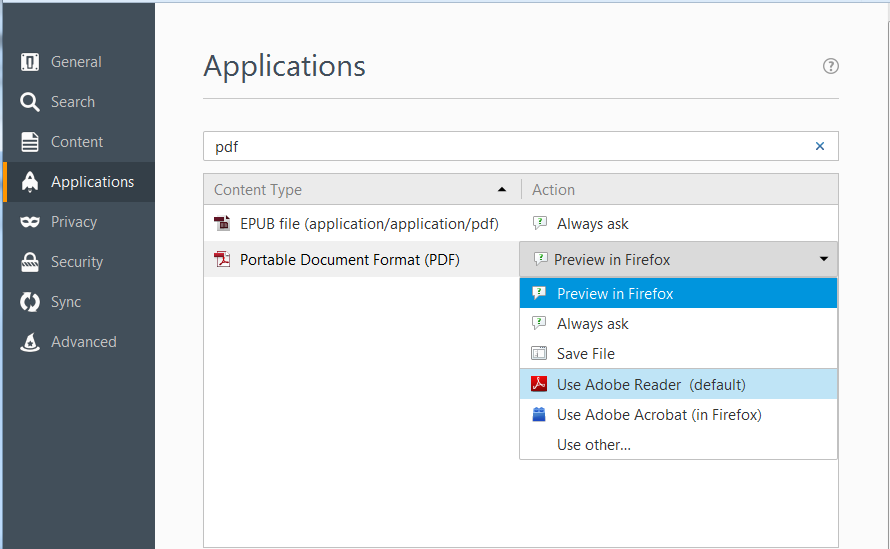
For more information, see these articles: View and edit PDF files using Firefox’s built-in viewer View and edit PDF files using Firefox’s built-in viewer
Many thanks for a pro answer.
Firefox should really by default present you with a dialog giving you the options in the first place instead of burying them...