


I'm not able to open www.pinterest.com, whenever I open the website I get a message that says ' Secure connection failed'

I tried clicking on Report errors like this to help Mozilla identify and block malicious sites and reloading the page but that doesn't work either.
선택된 해결법
Is Pinterest the only HTTPS address that gives you an error?
On the error page, if there is an "Advanced" button, could you click that and see whether you can extract more information, error codes, or other details about the reason for the problem.
Also, in case the site didn't already suggest this: What do the security warning codes mean?
모든 댓글 (5)
Hi !
A common cause for this is antivirus or security software intercepting secure connections.
In their attempts to helping you they are causing you to have this issue instead.
According to your system details you have Kaspersky installed; there may be a setting you can change.
See how that works and let us know, will you ?
Hey thanks for your suggestion :) I turned off the internet security but the website still failed to open.
선택된 해결법
Is Pinterest the only HTTPS address that gives you an error?
On the error page, if there is an "Advanced" button, could you click that and see whether you can extract more information, error codes, or other details about the reason for the problem.
Also, in case the site didn't already suggest this: What do the security warning codes mean?
Hey, thank you for your response .Yes Pinterest is the only site that doesn't open. I even tried opening it on google chrome but it didn't open there also and nope I don't get the advanced button option. I've attached an image for your reference. I did click on 'What does "Your connection is not secure" mean?' and followed the steps but that didn't work either :(
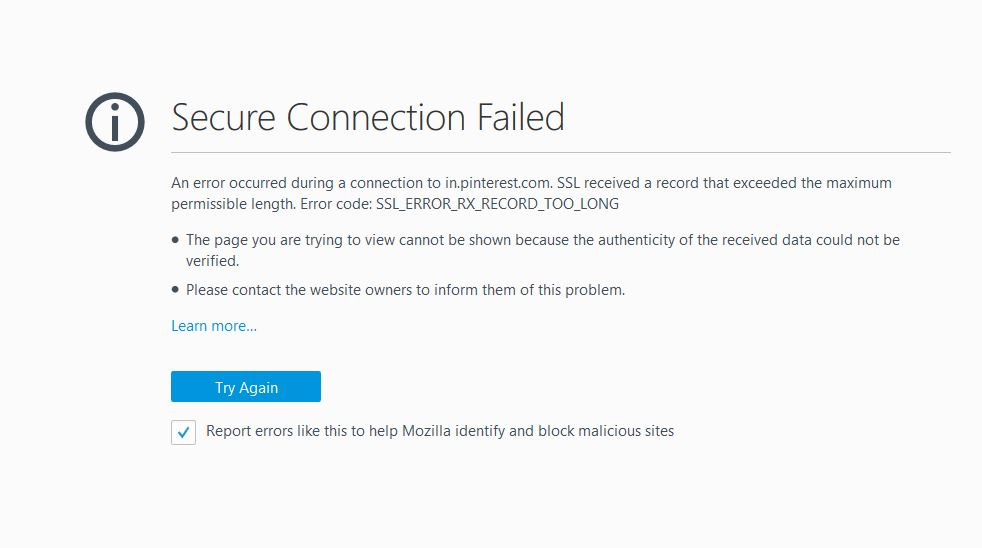
That code doesn't come up very often, and I'm not sure we've seen a consistent pattern. I have to log off but here's the recent threads:
https://support.mozilla.org/search/advanced?a=1&q=%22ssl_error_rx_record_too_long%22&sortby=1&w=2