


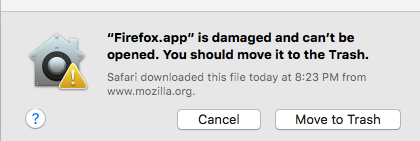
I downloaded 48.0.1 for OSX and the system reports it is a damaged file (downloaded 3 times--same problem); suggestions?

I downloaded 48.0.1 for OSX and the system reports it is a damaged file (downloaded 3 times--same problem); any suggestions?
Thanks!
선택된 해결법
Good news, I got it to work but in an unconventional way.
I've not had problems with the Gatekeeper setting at "Mac App store and Identified Developers" before when updating Firefox so I did not change it.
I ran the firefox.app from the installer dmg volume and it worked. Quit it and I copied it to ~fdoug/Applications folder--it ran there fine. Quit it, copied it to ~Applications, ran it and it works fine now. Go figure. I'm guessing it was a permission issue of some type although my Get Info permission settings appear normal.
This is my work computer and Admin does use LANrev to install some packages. I also have an enterprise version of Sophos on the machine--maybe one of those was blocking something? (But I never had the problem before.)
I'll keep my eye on it and I'll have a conversation with our admin tech jockies--if I hear of anything worthy I'll share back to here.
Thank you FredMcD, Moses, and James. I really appreciated your quick help!
모든 댓글 (7)

Did you use this link? http://www.mozilla.org/en-US/firefox/all/
Hi FredMcD, Yes I did. I suspect there is something wrong with the file that was posted.
I downloaded the English (US) version and also tried the English (British) version. Still a problem. Attached is a screenshot of the error dialog.

Try to download from Mozilla's FTP server.
https://ftp.mozilla.org/pub/firefox/releases/48.0.1/mac/en-US/
Try this instead, Install an older version of Firefox {web link}
I have escalated this post for more help.
fdoug said
Hi FredMcD, Yes I did. I suspect there is something wrong with the file that was posted.
fdoug said
I downloaded the English (US) version and also tried the English (British) version. Still a problem. Attached is a screenshot of the error dialog.
It is not a problem with the Mac version of Firefox 48.0.1 but due to say Gatekeeper on your system.
An example and possible fix options. http://apple.stackexchange.com/questions/175634/all-downloaded-files-cannot-be-opened-as-they-are-damaged-and-should-be-moved-t
선택된 해결법
Good news, I got it to work but in an unconventional way.
I've not had problems with the Gatekeeper setting at "Mac App store and Identified Developers" before when updating Firefox so I did not change it.
I ran the firefox.app from the installer dmg volume and it worked. Quit it and I copied it to ~fdoug/Applications folder--it ran there fine. Quit it, copied it to ~Applications, ran it and it works fine now. Go figure. I'm guessing it was a permission issue of some type although my Get Info permission settings appear normal.
This is my work computer and Admin does use LANrev to install some packages. I also have an enterprise version of Sophos on the machine--maybe one of those was blocking something? (But I never had the problem before.)
I'll keep my eye on it and I'll have a conversation with our admin tech jockies--if I hear of anything worthy I'll share back to here.
Thank you FredMcD, Moses, and James. I really appreciated your quick help!