


How do I delete the second draft folder that has just appeared?

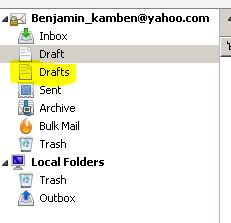
A second *Drafts* folder appeared on my Thunderbird Email client and I can not get rid of it. In the attached picture I have highlighted the folder I wish to remove in yellow.
선택된 해결법
Ok, right click the account And select subscribe. Ensure the draft folder is selected. (This is what Yahoo call the drafts folder. (note the "S" select the drafts folder select the first draft if you have any and press CTRL+A Drag these mails to the draft folder Right click the account Select settings In copies and folders for the account ensure Drafts is set to draft.
save your changes and restart Thunderbird. The drafts folder should disappear and the draft folder from Yahoo be retained.
문맥에 따라 이 답변을 읽어주세요 👍 1모든 댓글 (4)
Picture?
This is the picture i meant to add. Oops!
선택된 해결법
Ok, right click the account And select subscribe. Ensure the draft folder is selected. (This is what Yahoo call the drafts folder. (note the "S" select the drafts folder select the first draft if you have any and press CTRL+A Drag these mails to the draft folder Right click the account Select settings In copies and folders for the account ensure Drafts is set to draft.
save your changes and restart Thunderbird. The drafts folder should disappear and the draft folder from Yahoo be retained.
I was able to solve the problem with your help. Thank you.