


Chinese Characters, no Add-Ons enabled

I am do not have an add-ons enabled and I am seeing the characters on the tabs, and sometimes within pages. I've tried uninstalling, reinstalling, upgrading. Nothing seems to help. The characters obscure my ability to see what is on my tabs or to close tabs.
모든 댓글 (6)

Hi, I can't see it on your system, but do you have McAfee SiteAdvisor? Because it has caused this problem for some time.
If your question is resolved by this or another answer, please take a minute to let us know. Thank you.
The McAfee Site Advisor is disabled. There are no other add-ons enabled.
Can you attach a screenshot?
- http://en.wikipedia.org/wiki/Screenshot
- https://support.mozilla.org/kb/how-do-i-create-screenshot-my-problem
- Use a compressed image type like PNG or JPG to save the screenshot
- Make sure that you do not exceed the maximum size of 1 MB
Screen shot attached.
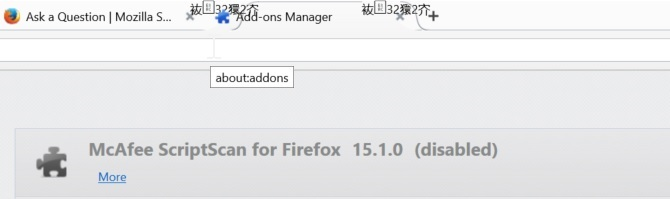
Can you try to remove this component if disabling isn't enough?
- How to uninstall SiteAdvisor:
http://service.mcafee.com/faqdocument.aspx?id=TS100162 - Strange characters (appears Chinese or Japanese:
https://community.mcafee.com/thread/76071
So - I tried to do that already. Basically, it looks like SiteAdvisor was installed as part of an Enterprise McAfee package. There is no way to remove that specific part of it. Back to Chrome!