


Firefox crashes

Firefox has suddenly begun to crash a couple seconds after starting it. I have tried starting in safemode, disabling add-ons, and reinstalling. Same problem...
I am using a windows surface pro 2 running windows 8.1 64bit.
모든 댓글 (3)
Try clearing your cache and then start the firefox Hope It'll work fine If not visit this site : http://mzl.la/MYlG5D It will help you for this problem :)
Hello scotchpyrate,. try to boot the computer in Windows Safe Mode with network support to see if that helps.
Also please follow the steps below to provide us crash IDs to help us learn more about your crash.
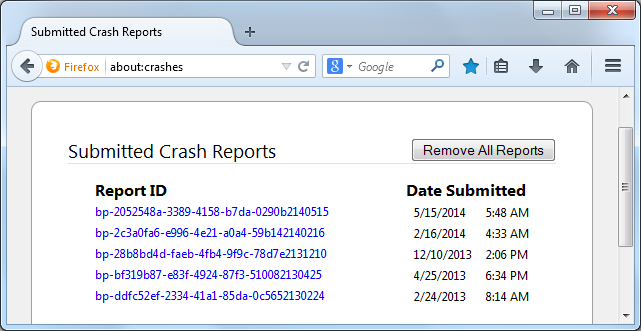
- Enter about:crashes in the Firefox address bar and press Enter. A Submitted Crash Reports list will appear, similar to the one shown below.
- Copy the 5 most recent Report IDs that start with bp- and then go back to your forum question and paste those IDs into the "Post a Reply" box.
Note: If a recent Report ID does not start with bp- click on it to submit the report.
(Please don't take a screenshot of your crashes, just copy and paste the IDs. The below image is just an example of what your Firefox screen should look like.)
Thank you for your help!
More information and further troubleshooting steps can be found in the Troubleshoot Firefox crashes (closing or quitting unexpectedly) article.
You can also do a malware check with several malware scanning programs on the Windows computer. Please scan with all programs because each program detects different malware. All these programs have free versions.
Make sure that you update each program to get the latest version of their databases before doing a scan.
- Malwarebytes' Anti-Malware:
http://www.malwarebytes.org/mbam.php - AdwCleaner:
http://www.bleepingcomputer.com/download/adwcleaner/
http://www.softpedia.com/get/Antivirus/Removal-Tools/AdwCleaner.shtml - SuperAntispyware:
http://www.superantispyware.com/ - Microsoft Safety Scanner:
http://www.microsoft.com/security/scanner/en-us/default.aspx - Windows Defender:
http://windows.microsoft.com/en-us/windows/using-defender - Spybot Search & Destroy:
http://www.safer-networking.org/en/index.html - Kasperky Free Security Scan:
http://www.kaspersky.com/security-scan
You can also do a check for a rootkit infection with TDSSKiller.
- Anti-rootkit utility TDSSKiller:
http://support.kaspersky.com/5350?el=88446
See also: