


Firefox bug when clicking "open link in new tab" or mouse wheel

I am starting to get this bug for a last few days. When I am trying to click "Open link in new tab" or, as usual using mouse wheel click, inside a Firefox window I got this for a couple of seconds before page shows up.
https://lh3.googleusercontent.com/-tbYPFx7jBn4/VIBxWfNBp8I/AAAAAAAABPM/yxArZ9Zbw88/s1000/bug.jpg

As you can see it's a mix of previous pages I was viewing for a last few days.... All those pages was not open at the this moment, it's just like a flash back :O) Any idea what may cause it?
선택된 해결법
You can try to disable OMTC and leave hardware acceleration in Firefox enabled.
- about:config page: layers.offmainthreadcomposition.enabled = false
You can open the about:config page via the location/address bar. You can accept the warning and click "I'll be careful" to continue.
문맥에 따라 이 답변을 읽어주세요 👍 1모든 댓글 (5)
hello Bubunya, maybe that's an issue with hardware acceleration - please try updating your graphics driver, or in case this doesn't solve the issue or there is no new version available at the moment, disable hardware acceleration in the firefox menu ≡ > options > advanced > general (that setting will take a restart of the browser to take effect).
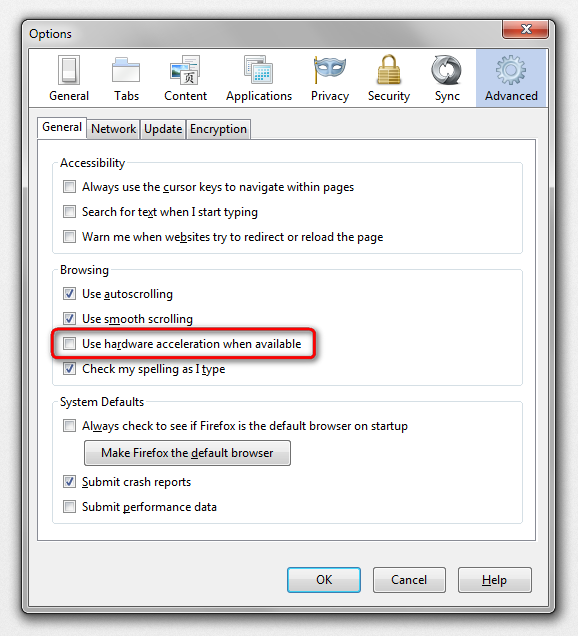
Did both, of 'cos. Nothing so far...
could you go to the firefox menu ≡ > help ? > troubleshooting information, copy the contents of that page and paste them here into a reply on the forum? this might give us a clue what is going on...
선택된 해결법
You can try to disable OMTC and leave hardware acceleration in Firefox enabled.
- about:config page: layers.offmainthreadcomposition.enabled = false
You can open the about:config page via the location/address bar. You can accept the warning and click "I'll be careful" to continue.
cor-el, thanks a lot sir! It works like a charm....