


The download button does not appear.

The download button does not appear on my toolbar at all and I can find no way to add it. Also, my download history does not load -- how do I restore it without the download button?
შერჩეული გადაწყვეტა
I got the answer Press de button Put settings back to normal With dat button in corner :)
ჩასწორების თარიღი: , ავტორი: Sil-va-no
ყველა პასუხი (6)
You're probably familiar with how the download button is supposed to look, as described on this page: Where to find and manage downloaded files in Firefox.
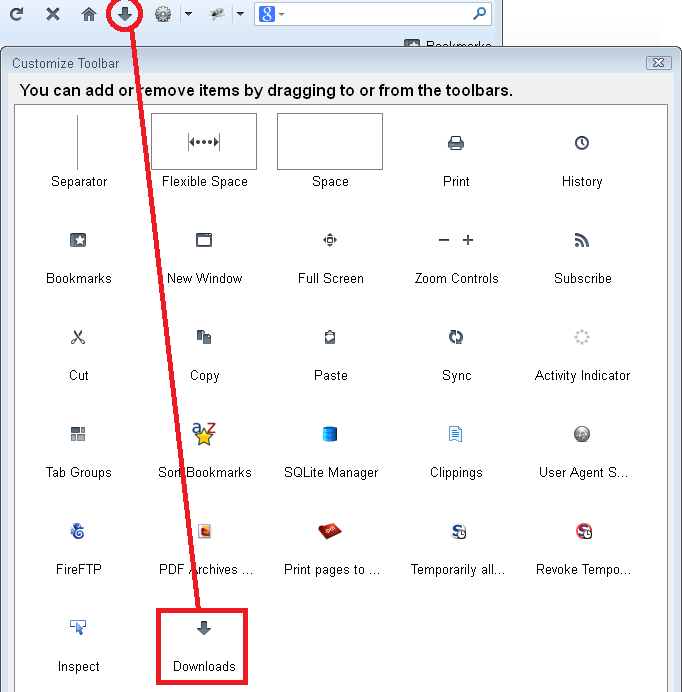
Could you check whether the button is in an unexpected location or has been retired to the Customize dialog? To get started, either:
- right-click a blank area of the tab bar > Customize
- tap the Alt key > View menu > Toolbars > Customize
Can you find it?
The shortcut to open download history is Ctrl+j.
On the menus, you can use either:
- orange Firefox button > Downloads
- Tools menu > Downloads
Are you saying you do not see your history there?
Did you change from the new history list back to the old one?
No, I do not have the download button in my Customize Toolbar listing -- you have many more icons in yours than I do in mine.
When I use ctrl-j I get a blank download window.
Does the about:downloads page shows the downloads?
Use Toolbar Layout (Customize) to open the Customize window and set which toolbar items to display.
- check that "Bookmarks Toolbar items" is on the Bookmarks Toolbar
- if missing items are in the toolbar palette then drag them back from the Customize window on the toolbar
- if you do not see an item on a toolbar and in the toolbar palette then click the "Restore Default Set" button to restore the default toolbar set up
You can check for problems with the localstore.rdf file if this didn't work.
ჩასწორების თარიღი: , ავტორი: cor-el
შერჩეული გადაწყვეტა
I got the answer Press de button Put settings back to normal With dat button in corner :)
ჩასწორების თარიღი: , ავტორი: Sil-va-no