


Duplicate folders cannot be deleted

I installed Thunderbird on my new laptop, then imported the profile from my old laptop
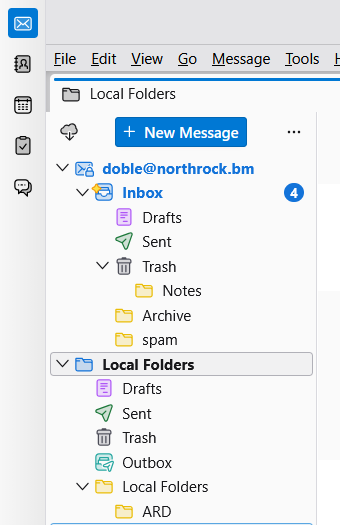
The main screen has, under "Inbox", folders for Drafts, Sent, Trash, Archive and Spam, which are being used by the program
Folders for Drafts, Sent and Trash also appear under "Local Folders" (along with Outbox) and these aren't being used by the program.
How do I get rid of these duplicate folders? "Spam" had a delete option, so that was easy, but the others don't.
I tried the two suggestions for a previous "Duplicates" question but they didn't resolve things.
Thank you
ყველა პასუხი (16)
შერჩეული გადაწყვეტა
If this problem did not exist on old computer, then you may want to redo this. I assume both computers run the same version of thunderbird.

Redo what? I have a duplicate spam folder. Other computers are not a factor. I simply want to delete one of the duplicate spam folders.
I found this on another site:
To use the original server folder names set preference mail.useLocalizedFolderNames to false. (That can be done by clicking settings>general and clicking the 'config editor' button in lower right.
Special folders can no longer be renamed or deleted. In case of doubled-up folders, check the account configuration to see where Draft, Spam, etc. folders are referenced and make sure the desired folder is used. In cases which resist, the add-on FolderFlags can be used to clear folder flags and make folders deleteable.
Let me know if that works.
I have got rid of most of them by just deleting the relevant folders and .msf files from within the profile - Mail - Local Folders
I have left Trash and Outbox in case they are needed by the system, but deleting the others has freed up enough real estate to show all of my folders on screen

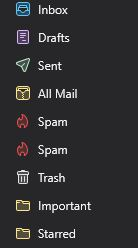
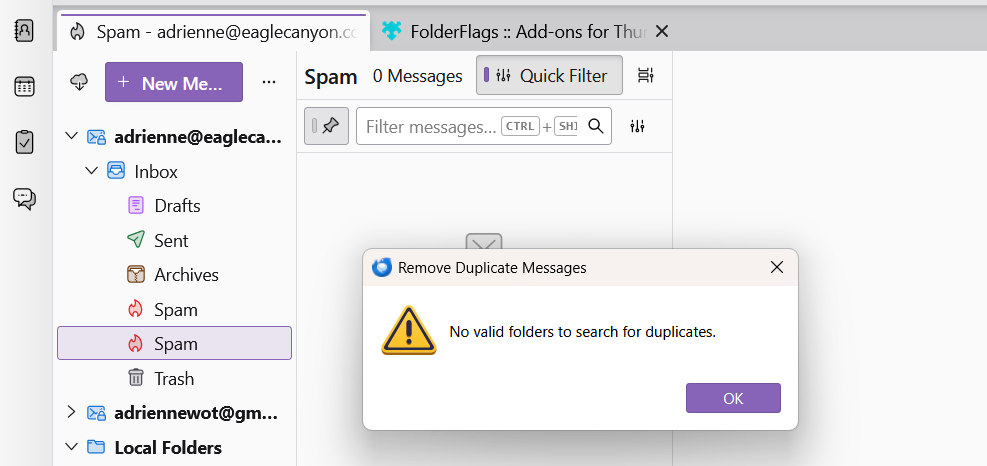
I have a duplicate spam folder which was created because I hit the "spam again" by mistake (I also noticed there is an "inbox again" choice - why?) I am new to thunderbird (converted from Outlook 2007, may it RIP) and downloaded (per search instructions) the 1 - Duplicates add on, which does not help (see screenshot), and 2 - the Folder Flags add on, which I cannot figure out how to use. How do I delete this duplicate folder? How do I use the Folder Flags add on? Please?!? Pretty please with a cherry on top??? Thank you.
Also, I have Thunderbird installed on 4 devices (laptop, desktop computer, phone and tablet). It seems I am getting ALL the incoming emails on ALL my devices ALL the time (sounds like a movie). Is there a place to tell Thunderbird to delete the emails once they have been "dealt with" on one of the devices (deleted, moved to spam or another folder). Most often, that will be my laptop, but I am giddy over the ability to get them on my phone and tablet, especially when we travel. Thank you - you guys and gals are rock stars!
Rock stars, huh? I'll need to let my hair grow longer. And my clothes.... yikes. no rock star would be caught in off-the-rack jeans. Anyway, with all the messages on all devices (I am assuming all are setup as IMAP0, when you delete from one, it deletes from all. when you send from one, the sent message can be viewed by all.
Great, thank you. Any help about the duplicate spam folder, or how to use the Folder Flags add on, which I cannot figure out how to use. How do I delete this duplicate folder? I am just putting it out there in hopes of a fix. Yes, I read hedgehog's post and your replies, and I know the definition of insanity, ha-ha. Thank you :)
I found this info on another site. It may help with the duplicates:
The Thunderbird folks renamed Junk to Spam throughout the product. There is no way going back.
The localisation of IMAP special folders (Inbox, Drafts, Templates, Sent, Archives, Outbox) has changed, they are now all localised and the original folder names on the server are ignored. To use the original server folder names set preference mail.useLocalizedFolderNames to false.
Special folders can no longer be renamed or deleted. In case of doubled-up folders, check the account configuration to see where Draft, Spam, etc. folders are referenced and make sure the desired folder is used. In cases which resist, the add-on FolderFlags can be used to clear folder flags and make folders deleteable.
From that, I think that, if you click settings>general, scroll to the bottom right to the config editor button and search for mail.useloalizedfoldernames and toggle to false and save, that you may be able to delete the unwanted duplicate. I admit I have not used the folderflags addon.
ჩასწორების თარიღი: , ავტორი: david
I have managed to delete the Spam folder
However, whenever I restart Thunderbird, up it pops again :-(
Let me check around a bit. Mozilla's decisions may not always be well thought. :)

This is my first post as I am in the midst of moving from Outlook to Thunderbird.
David - your comment about renaming Junk to Spam throughout raises a question. I have a "Spam" folder but when I start TB it automatically creates a "Junk" folder. Empty but with the Spam icon. Why does it create the "Junk" if they moved to "Spam" and how can I stop this happening?
Thanks!
Please remember I am only a volunteer. I share what I see and experience, and keeping up with whatever new ideas come from Mozilla is not easy, as some of their decisions make no sense to me. All I can suggest are the changes I listed earlier in this thread. A possibility is to check your account online to find which folder is used by the account when online and then see if you can delete or unsubscribe from the other one. And, there may be others on this forum who have a clearer grasp of the issue. I regret I cannot not offer more..
Thanks David, I completely understand your situation. I suspect that the developers haven't completely moved from "Junk" to "Spam" because if I mark a message in my inbox as spam, it moves to the "Junk" folder rather than the "Spam" folder. I'll keep investigating. The more I use TB, the more I find little things it doesn't do as well as hoped but that is balanced by a lot of little stuff that makes it easier to use. All part of the quest to remove as much Microsoft as I can from my environment...
Andrew, thank you for your thoughts. I do think the Mozilla folks have good intentions, but sometimes they stray too far into our lives. But most, the big majority, of what they do is good. I'm still annoyed that they forced threaded mail as a default on us in 2022, but they did fix it handsomely three years later. So, it's like most relationships; some ideas are good and some not, but the overall direction is positive. Welcome to thunderbird. And, because thunderbird has many tweaks, I encourage you to familarize yourself with it. a good place to start is at this site: https://support.mozilla.org/en-US/kb/getting-started-thunderbird-main-window-supernova
Ha-ha! David, you make some good points. Clearly, Mozilla and many other software developers have never heard the saying, "If it ain't broke, don't fix it." That is one reason I stuck with Office 2007 (including Outlook) until I was dragged kicking and screaming into Windows 11. Sadly now, those of us who may have been somewhat tech savvy 30 years (that is AS FAR back as I am willing to admit) ago have fallen off the tech savvy wagon.
That said, I DID attempt to use the Folder Flags add on and determined it is NOT useful for deleting my duplicate spam folder. My next attempt will be to see if the duplicate spam folder has a separate "path" in the app data file. Wish me luck and thank you for continuing to research this issue for us. Have a peaceful weekend. :)
adrienne6, thanks for starting my day with a smile. Priceless. :)