


ღია
Can't update Firefox to current version

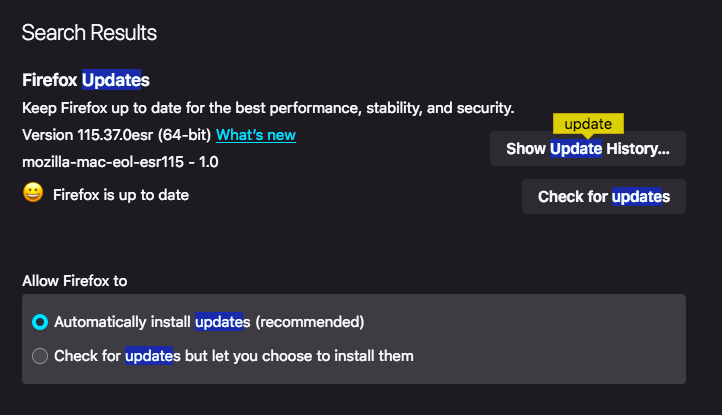
I currently have Version 115.37.0esr (64-bit). When I click Check For Updates, it says I'm updated to the current version, but apparently the current version is 152.0.6. Why can't I get this version?
I currently have Version 115.37.0esr (64-bit). When I click Check For Updates, it says I'm updated to the current version, but apparently the current version is 152.0.6. Why can't I get this version?
ყველა პასუხი (1)
You appear to be using the old EOL macOS 10.13 as to why. Firefox 116.0 and later requires macOS 10.15 (ten.fifteen) or later to run. The older Firefox 115 ESR is still being updated so the EOL macOS 10.12, 10.13, 10.14 and Windows 7, 8, 8.1 OS users can still have a secure web browser to use.
https://support.mozilla.org/en-US/kb/firefox-users-macos-1012-1013-1014-moving-to-extended-support
If you can update your macOS to 10.15 or later then you can use the current versions like Fx 152.0.6.