Open
Automatically deleting emails from server when downloaded into Thunderbird

When email downloads from my internet server to thunderbird how do I indicate that the message is to be deleted from the server. ie I dont want the message to be in two places . At the moment after reading the email and saving it to a folder I have to log into my internet provider and delete the email.
When email downloads from my internet server to thunderbird how do I indicate that the message is to be deleted from the server. ie I dont want the message to be in two places . At the moment after reading the email and saving it to a folder I have to log into my internet provider and delete the email.
ყველა პასუხი (1)
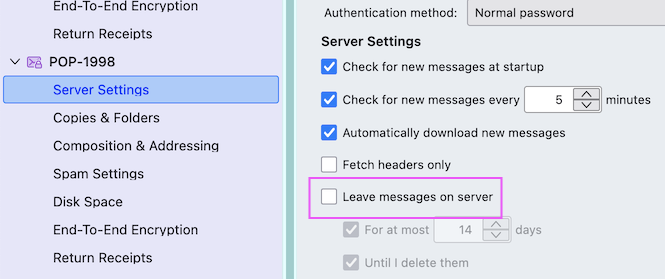
I presume that your email account is set up with the POP protocol. Click on the App button ≡ in the upper right corner > Account settings > Server Settings > Server Settings and uncheck ▢ "Leave messages on server" (see image)