


Firefox Unusable Because of Excessive CPU Usage

I've just opened one simple Web site (in addition to Mozilla), and already CPU usage sits at about 20%! Please refer to my recent posts here at "Why is Firefox Suddenly Taking Over my CPU?" for the problem description. I'm re-posting simply in hopes that I can "send data" on this one from outside my sandbox. Regards -- jclarkw
გადაწყვეტა შერჩეულია
One of your extension is doing it. Try to disable extensions one by one to find the responsible.
პასუხის ნახვა სრულად 👍 0ყველა პასუხი (12)
Hello,
Here are some issues that have been found to be solutions :
- extensions (check every extension)
- Heavy webpage content ( if the site has lots of animations and stuff, open task manager and see if that tab is the reason)
- Hardware acceleration issues : Try disabling it in Settings > General > Performance.
- Outdated graphics drivers (update in device manager)
- Clear cache and cookies or refreshing Firefox (Note that cookies can sign you out of some websites.
- or Malware
If not, it is most likely because that the CPU is older, and can't handle as much. Especially for one of my computers, sometimes it takes up to 50% CPU load when streaming videos.
Dear dessertdish -- Thanks much for the suggestions! One note regarding your old-hardware point: Although the hardware is indeed old, I also run Chrome on it; and moving the offending Web sites to Chrome, although it relieves the CPU usage by Firefox, does not replace it with a comparable usage by Chrome. This and the fact that the problem seemed to have a suddent (recent) onset suggested to me that it was a Firefox issue.
The best (unsatisfying) solution so far has been to use Chrome for anything that causes Firefox to load down the computer. Cheers! -- jclarkw
Hi
Are you able to share the address of the website that is causing this to happen?
Does this only happen with this one website?
Paul said
Hi Are you able to share the address of the website that is causing this to happen? Does this only happen with this one website?
Paul -- Thanks for your post. It happens with most Web sites, exept those on this forum apparently. Here's one example that, although simply a static image, sends the CPU usage up for at least several minutes. It usually settles down eventually:
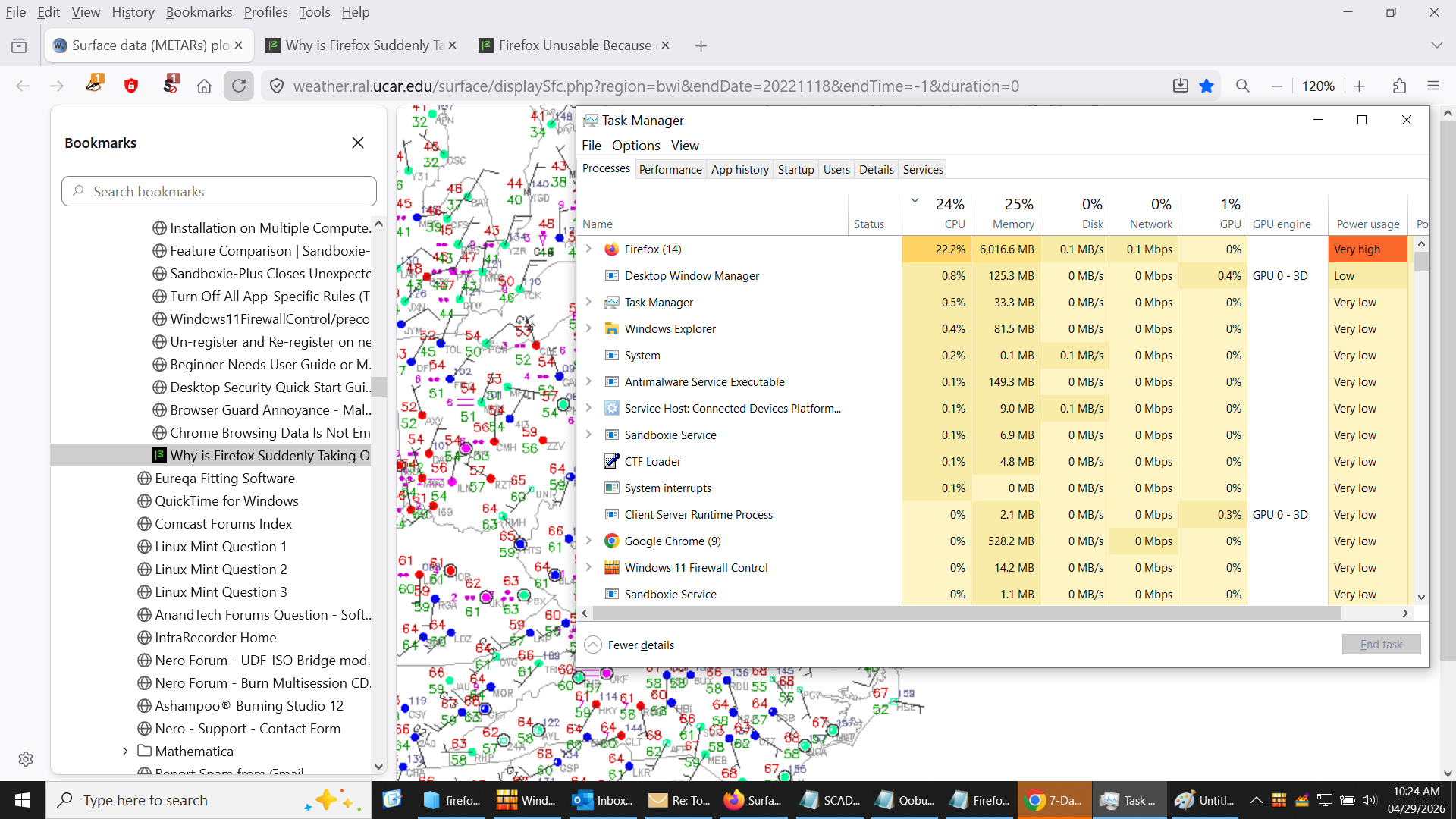
I'm attaching an image of what happens when I invoke this site.
To repeat myself a bit, note that Chrome is not using much CPU in the image, even though it's displaying all of my usual weather data, including the one above. -- jclarkw
Paul said
...Are you able to share the address of the website that is causing this to happen?
Hi, Again, Paul -- Were you able to make any progress with the example Web site that I posted here? I am still stuck and have yet to receive anything from tech support. Regards -- jclarkw
შერჩეული გადაწყვეტა
One of your extension is doing it. Try to disable extensions one by one to find the responsible.
TyDraniu said
One of your extension is doing it. Try to disable extensions one by one to find the responsible.
Thanks for your suggestion. I'll check it out and report. -- jclarkw
jclarkw said
TyDraniu said
One of your extension is doing it. Try to disable extensions one by one to find the responsible.Thanks for your suggestion. I'll check it out and report. -- jclarkw
VERY PECULIAR! -- I had tried this once before in response to a post here by dessertdish, but it hadn't seemed to help. (There are only three extensions, NoScript, Privacy Badger, and AdBlocker Ultimate.)
But disabling them all just now cut CPU usage back a lot! Even more surprising, after re-enabling them one at a time, CPU usage was still low, as it should be! We'll see if it lasts...
Does this make any sense to anybody? -- jclarkw
jclarkw said
jclarkw said
TyDraniu said
One of your extension is doing it. Try to disable extensions one by one to find the responsible.Thanks for your suggestion. I'll check it out and report. -- jclarkw
VERY PECULIAR! -- I had tried this once before in response to a post here by dessertdish, but it hadn't seemed to help. (There are only three extensions, NoScript, Privacy Badger, and AdBlocker Ultimate.)
But disabling them all just now cut CPU usage back a lot! Even more surprising, after re-enabling them one at a time, CPU usage was still low, as it should be! We'll see if it lasts...
Does this make any sense to anybody? -- jclarkw
Well that didn't last long. I came back to my PC after lunch and checked my webmail (the only tab I opened, other than this forum, during/after testing the effects of disabling extensions). That brought back the high CPU usage by Firefox!
Problem not solved yet... -- jclarkw
TyDraniu said
One of your extension is doing it. Try to disable extensions one by one to find the responsible.
More time passes... I tried the same experiment again, except that this time I left AdBlocker Ultimate blocked, so I'm now running only NoScript and Privacy Badger. All is OK again with my Webmail and two Mozilla forum threads... so far.
Again, we'll see how long it lasts... -- jclarkw
jclarkw said
TyDraniu said
One of your extension is doing it. Try to disable extensions one by one to find the responsible.More time passes... I tried the same experiment again, except that this time I left AdBlocker Ultimate blocked, so I'm now running only NoScript and Privacy Badger. All is OK again with my Webmail and two Mozilla forum threads... so far.
Again, we'll see how long it lasts... -- jclarkw
Still working this morning with more web sites added in new tabs.
I guess the problem was indeed AdBlock Ultimate! Has anyone else had problems with this add-on? -- jclarkw
ჩასწორების თარიღი: , ავტორი: jclarkw