


Windows 10 reached EOS (end of support) on October 14, 2025. If you are on Windows 10, see this article.

Avatar for Username

ძიება მხარდაჭერაში

ნუ გაებმებით თაღლითების მახეში. აქ არავინ უნდა მოგთხოვოთ ტელეფონზე დარეკვა, შეტყობინების გაგზავნა ან პირადი მონაცემების გაზიარება. რამე საეჭვოს შემჩნევისას გთხოვთ გვაცნობოთ „დარღვევის მოხსენებით“.

ვრცლად

I deleted the VPN button after the latest update and would like to get it back. Any thoughts?

  • 3 პასუხი
  • 1 მომხმარებელი წააწყდა მსგავს სიძნელეს
  • 90 ნახვა
  • ბოლოს გამოეხმაურა Agent virtuel
  • გადაწყვეტილი

I deleted the VPN button after the latest update and would like to get it back. I found VPN in the Settings but the VPN button is disabled, and nothing happens. Need suggestions -- thanks.

I deleted the VPN button after the latest update and would like to get it back. I found VPN in the Settings but the VPN button is disabled, and nothing happens. Need suggestions -- thanks.

გადაწყვეტა შერჩეულია

FXP, sometimes removed UI buttons can be restored from the Customise page.

To open the page right-click any of the UI buttons near the top of the screen until one offers the option "Customise Toolbar".

If you find the VPN button on the Customise page then you can either drag it to a desired location, or right-click it and choosse a pin option.

პასუხის ნახვა სრულად 👍 0

ყველა პასუხი (3)

შერჩეული გადაწყვეტა

FXP, sometimes removed UI buttons can be restored from the Customise page.

To open the page right-click any of the UI buttons near the top of the screen until one offers the option "Customise Toolbar".

If you find the VPN button on the Customise page then you can either drag it to a desired location, or right-click it and choosse a pin option.

ჩასწორების თარიღი: , ავტორი: TechHorse

There is no VPN button on the Customise page if you dont have this option enabled (screenshot).
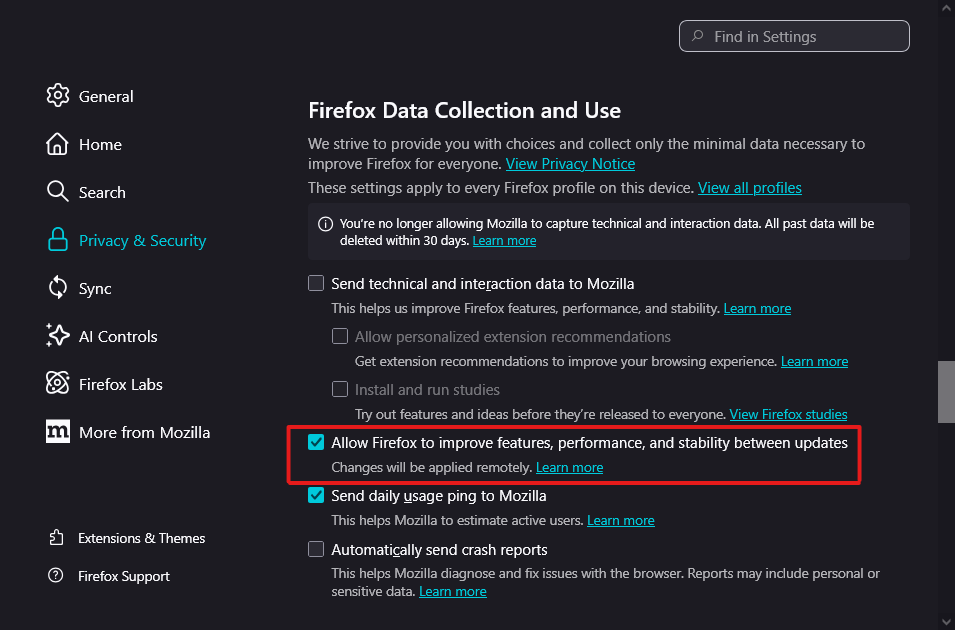
Hello

https://support.mozilla.org/en-US/questions/1577633#answer-1812889 ?

Check, browser.ipProtection.enabled

დასვით კითხვა

უნდა შეხვიდეთ ანგარიშზე პასუხის დასაწერად. გთხოვთ, დასვათ ახალი შეკითხვა, თუ ჯერ არ გაქვთ ანგარიში.