


Windows 10 reached EOS (end of support) on October 14, 2025. If you are on Windows 10, see this article.

Avatar for Username

ძიება მხარდაჭერაში

ნუ გაებმებით თაღლითების მახეში. აქ არავინ უნდა მოგთხოვოთ ტელეფონზე დარეკვა, შეტყობინების გაგზავნა ან პირადი მონაცემების გაზიარება. რამე საეჭვოს შემჩნევისას გთხოვთ გვაცნობოთ „დარღვევის მოხსენებით“.

ვრცლად
გადაწვეტილი დაარქივებული

Weather Widget on Homepage Only Allows me to Choose Canadian Cities

Steve

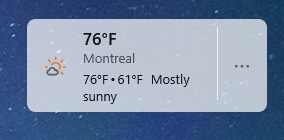
The weather widget on my FireFox homepage, as well as the information when I type "weather" into the address bar shows me as in Montreal QC, Canada. But I am in New Hampshire, USA. When I try to type a different city name after clicking the 3 dots next to the widget and choosing change location the only cities that come up are Canadian cities.

I am not running any kind of VPN, and when I check my location with an IP lookup it shows me in the correct location, my locale settings in Windows are set the the US as well.

Thanks for any help!
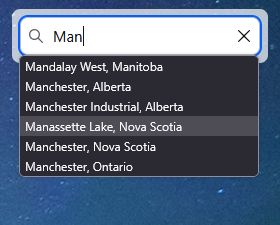
The weather widget on my FireFox homepage, as well as the information when I type "weather" into the address bar shows me as in Montreal QC, Canada. But I am in New Hampshire, USA. When I try to type a different city name after clicking the 3 dots next to the widget and choosing change location the only cities that come up are Canadian cities. I am not running any kind of VPN, and when I check my location with an IP lookup it shows me in the correct location, my locale settings in Windows are set the the US as well. Thanks for any help!
მიმაგრებული ეკრანის სურათები

ყველა პასუხი (3)

You're right, I can confirm that. Something's wrong. We've reported it yesterday, but there's no answer yet.

შერჩეული გადაწყვეტა

This issue should be fixed now,try again.

Yes! I noticed this afternoon that it was showing a local city and was able to edit it to my city!! Perfect, thank you!!