


Windows 10 reached EOS (end of support) on October 14, 2025. If you are on Windows 10, see this article.

Avatar for Username

ძიება მხარდაჭერაში

ნუ გაებმებით თაღლითების მახეში. აქ არავინ უნდა მოგთხოვოთ ტელეფონზე დარეკვა, შეტყობინების გაგზავნა ან პირადი მონაცემების გაზიარება. რამე საეჭვოს შემჩნევისას გთხოვთ გვაცნობოთ „დარღვევის მოხსენებით“.

ვრცლად

XULRunner Error

  • 1 პასუხი
  • 5 მომხმარებელი წააწყდა მსგავს სიძნელეს
  • 200 ნახვა
  • ბოლოს გამოეხმაურა jscher2000 - Support Volunteer
  • დაარქივებული

Every other day, I open FireFox and may get the following error: XULRunner - This profile was last used with a newer version of this application. Please create a new profile. Also, this error may come up while I already have had FireFox open for a while. Once this error comes up, I check the version, and sometimes the version is older than what it was, meaning, FireFox reverted back to an older version on it's own. I created a new profile, but the error comes back. I removed FireFox and all folders, and the error still comes back. There is nothing I can do to stop the error from showing up again. See attached images. I am on Windows 11 23H2, all windows updates caught up, and the current FireFox browser version is 138.03.
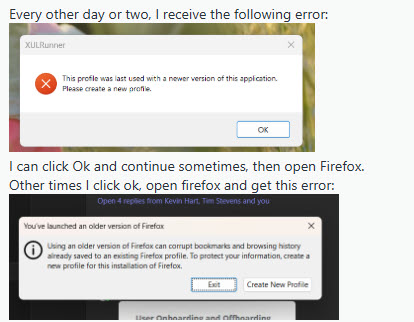
Every other day, I open FireFox and may get the following error: XULRunner - This profile was last used with a newer version of this application. Please create a new profile. Also, this error may come up while I already have had FireFox open for a while. Once this error comes up, I check the version, and sometimes the version is older than what it was, meaning, FireFox reverted back to an older version on it's own. I created a new profile, but the error comes back. I removed FireFox and all folders, and the error still comes back. There is nothing I can do to stop the error from showing up again. See attached images. I am on Windows 11 23H2, all windows updates caught up, and the current FireFox browser version is 138.03.
მიმაგრებული ეკრანის სურათები

ყველა პასუხი (1)

Could you take a look at what Firefox thinks you were using before? Here's how:

Type or paste this shortcut path into the Windows search box, or the address bar of Windows File Explorer, then press Enter to submit it:

%APPDATA%\Mozilla\Firefox\Profiles

Each of the weirdly named folders here will have its own compatibility.ini file which lists the last-used version of Firefox. Do you see any anomalous results that might indicate a hidden installation of Firefox?