Windows 10 reached EOS (end of support) on October 14, 2025. If you are on Windows 10, see this article.

Avatar for Username

ძიება მხარდაჭერაში

ნუ გაებმებით თაღლითების მახეში. აქ არავინ უნდა მოგთხოვოთ ტელეფონზე დარეკვა, შეტყობინების გაგზავნა ან პირადი მონაცემების გაზიარება. რამე საეჭვოს შემჩნევისას გთხოვთ გვაცნობოთ „დარღვევის მოხსენებით“.

ვრცლად

Firefox on PC running Windows 7 - Firefox Starting up

  • 1 პასუხი
  • 0 მომხმარებელი წააწყდა მსგავს სიძნელეს
  • 149 ნახვა
  • ბოლოს გამოეხმაურა jeff-g
  • დაარქივებული

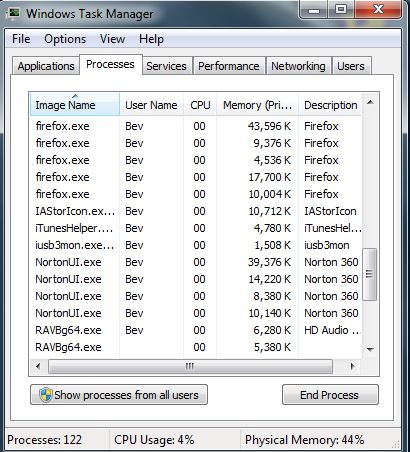
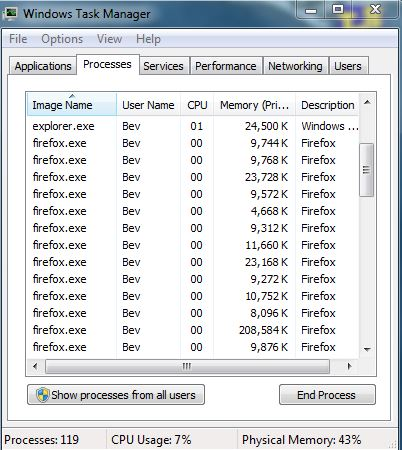
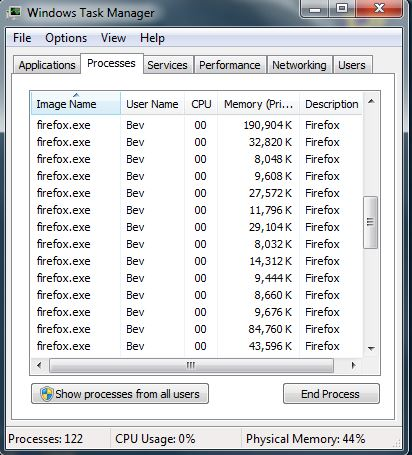
I am running Firefox in Windows 7 on a PC. When I start up Firefox, in WINDOWS Task Manager there appear between 20 and 30 instances of firefox.exe of different sizes in the Processes Window. I can End Process on most of them without shutting down Firefox or any of the other instances of firefox.exe. However if I shut down one listed with about 200,000K of Memory (Private Working Set), then Firefox shuts down and all other instances of Firefox disappear. If I open an new tab in Firefox, more instances of firefox.exe appear.

I have never seen this behavior before. I tried uninstalling and reinstalling Firefox, but the same behavior occurred. Is this normal behavior, or should I be concerned?

I have enclosed screen shots from the Task Manager. I also have a Dump File of a couple of the firefox.exe instances, including the large one, if that would be helpful.

Thank you.
I am running Firefox in Windows 7 on a PC. When I start up Firefox, in WINDOWS Task Manager there appear between 20 and 30 instances of firefox.exe of different sizes in the Processes Window. I can End Process on most of them without shutting down Firefox or any of the other instances of firefox.exe. However if I shut down one listed with about 200,000K of Memory (Private Working Set), then Firefox shuts down and all other instances of Firefox disappear. If I open an new tab in Firefox, more instances of firefox.exe appear. I have never seen this behavior before. I tried uninstalling and reinstalling Firefox, but the same behavior occurred. Is this normal behavior, or should I be concerned? I have enclosed screen shots from the Task Manager. I also have a Dump File of a couple of the firefox.exe instances, including the large one, if that would be helpful. Thank you.
მიმაგრებული ეკრანის სურათები

ყველა პასუხი (1)

Google zombie processes - seems its a known issue for years and firefox doesn't have anything to do with it, looks like an operating system error some sort. Just giving a reply, never seen it myself but off hand sounds like it eventually clears itself.