Windows 10 reached EOS (end of support) on October 14, 2025. If you are on Windows 10, see this article.

Avatar for Username

ძიება მხარდაჭერაში

ნუ გაებმებით თაღლითების მახეში. აქ არავინ უნდა მოგთხოვოთ ტელეფონზე დარეკვა, შეტყობინების გაგზავნა ან პირადი მონაცემების გაზიარება. რამე საეჭვოს შემჩნევისას გთხოვთ გვაცნობოთ „დარღვევის მოხსენებით“.

ვრცლად

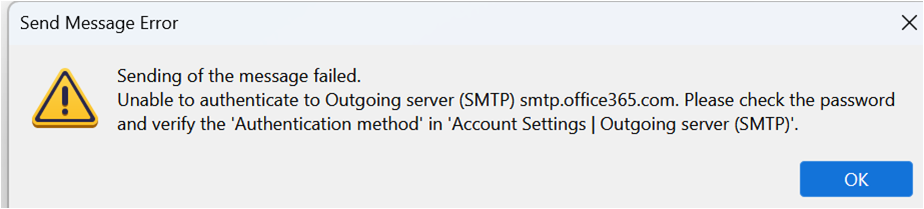
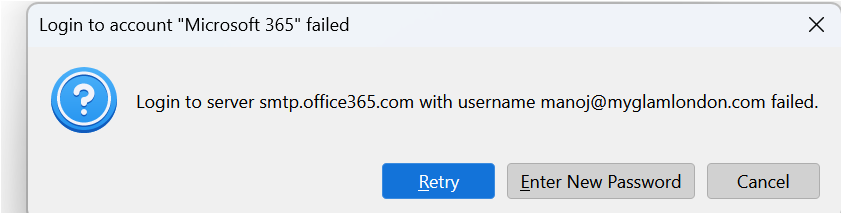
Login to server smtp.office365.com with username failed

  • 1 პასუხი
  • 0 მომხმარებელი წააწყდა მსგავს სიძნელეს
  • 102 ნახვა
  • ბოლოს გამოეხმაურა sfhowes
  • დაარქივებული

All the settings for both incoming and outgoing servers are correct. I can receive emails but cannot send any from Tbird. I keep getting an error message that says "Login to server smtp.office365.com with username failed". Additionally, the SEND folder is not visible in my email folders. I have confirmed that the outgoing server information in the account settings is correct, please see the screen shots.

Server Name - smtp.office365.com Port-587 Connection Security- STARTTLS Authentication method - OAUTH2 Username: my full email ID

Please can you help how can I resolve this error, thanks.
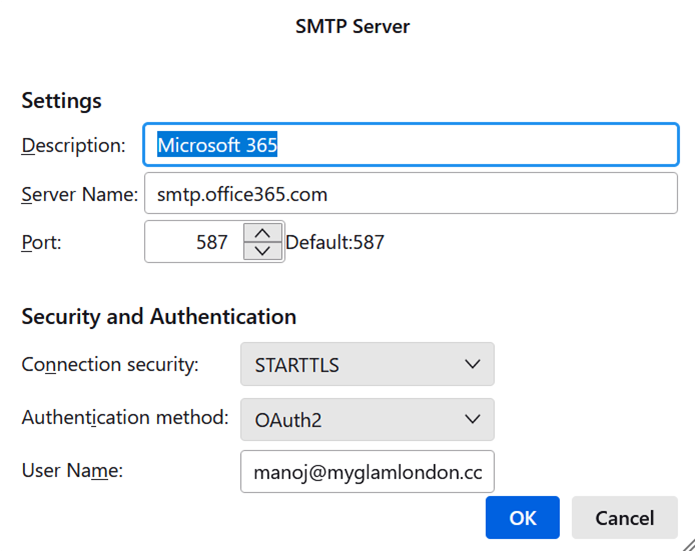
All the settings for both incoming and outgoing servers are correct. I can receive emails but cannot send any from Tbird. I keep getting an error message that says "Login to server smtp.office365.com with username failed". Additionally, the SEND folder is not visible in my email folders. I have confirmed that the outgoing server information in the account settings is correct, please see the screen shots. Server Name - smtp.office365.com Port-587 Connection Security- STARTTLS Authentication method - OAUTH2 Username: my full email ID Please can you help how can I resolve this error, thanks.
მიმაგრებული ეკრანის სურათები

ყველა პასუხი (1)

You shouldn't see the 2nd picture with the password prompt if the authentication is OAuth2, but there might be an obsolete password in Saved Passwords. Remove all entries for the account in Settings/Privacy & Security, Saved Passwords, restart TB, enter the account password in the OAuth window to allow access. Check that the incoming authentication is also OAuth2.