


How do I see what my previous version of Firefox was if I need to downgrade?

I recently updated to Firefox version 84.0. I also updated my video drivers a short while afterwards. This appears to have caused issues with video streaming on the browser. I need to see if this is an issue inherent to version 84, or if this is a result of a driver glitch, as I had encountered a previous streaming issue which I later resolved. I want to check my previous version of Firefox to see if the issue persists on that browser. If it does, then I know the issue is the drivers, and if not, then I would know the issue is version 84.0 of Firefox. However, I am unsure how to see exactly which version of the browser I updated from, which makes it difficult to know which downgraded version to test this on. Can anyone help?
ყველა პასუხი (8)
What's in the "Show Update History"?
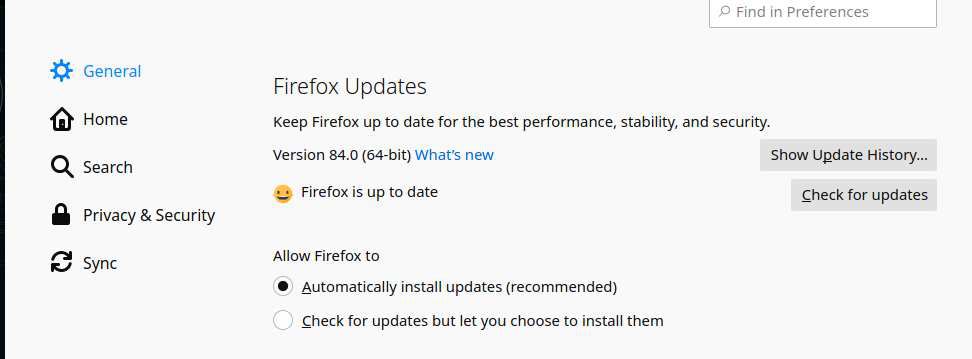
I...never even knew that was there, actually. That actually helps. I've fixed the streaming issue, at least for now. The only other problem I'm having now is that Firefox keeps signing me out of Twitter and Amazon despite the fact that I never tell it to do that.

Your ‘logged-in’ status is stored in special cookies. If the cookie is removed, you are logged out.
You may be in Private Browsing mode or told Firefox not to remember.
Type about:preferences#privacy<enter> in the address bar. The button next to History, select Use Custom Settings.
Turn off Always Use Private Browsing Mode Turn on Remember My Browsing And Download History At the bottom of the page, turn on Clear History When Firefox Closes. At the far right, press the Settings button. Turn on ONLY Cache and Form And Search History leaving the others off.
Macs: Make sure you install Firefox properly and that you do not run
Firefox from within the DMG (Disk Images) file.
FredMcD said
Your ‘logged-in’ status is stored in special cookies. If the cookie is removed, you are logged out. You may be in Private Browsing mode or told Firefox not to remember. Type about:preferences#privacy<enter> in the address bar. The button next to History, select Use Custom Settings. Turn off Always Use Private Browsing Mode Turn on Remember My Browsing And Download History At the bottom of the page, turn on Clear History When Firefox Closes. At the far right, press the Settings button. Turn on ONLY Cache and Form And Search History leaving the others off. Macs: Make sure you install Firefox properly and that you do not run Firefox from within the DMG (Disk Images) file.
I'll give those a shot. Most of those were already set, and I've never told Firefox not to log me out of those. I usually have it set to remember me on Twitter and Amazon, which, aside from Gmail, seem to be the only ones that constantly sign me out. The rest of the sites I use never do.
FredMcD said
Your ‘logged-in’ status is stored in special cookies. If the cookie is removed, you are logged out. You may be in Private Browsing mode or told Firefox not to remember. Type about:preferences#privacy<enter> in the address bar. The button next to History, select Use Custom Settings. Turn off Always Use Private Browsing Mode Turn on Remember My Browsing And Download History At the bottom of the page, turn on Clear History When Firefox Closes. At the far right, press the Settings button. Turn on ONLY Cache and Form And Search History leaving the others off. Macs: Make sure you install Firefox properly and that you do not run Firefox from within the DMG (Disk Images) file.
So, I tried that, and it didn't work. Twitter, Amazon, and Gmail still keep randomly getting logged out, while everything else I'm signed into remains signed in. Not sure why. Anyone have any possible suggestions?
Profile data can be removed or not recorded in several ways;
- 1) Running Firefox in Private Mode (nothing is recorded)
- 2) Privacy settings; (In the address bar, type about:preferences#privacy<enter>)
- 3) Many disk cleaners and anti-virus type programs can remove data from browsers
Open their settings and have them leave the browsers alone. - 4) Mal-ware.
FredMcD said
Profile data can be removed or not recorded in several ways;
- 1) Running Firefox in Private Mode (nothing is recorded)
- 2) Privacy settings; (In the address bar, type about:preferences#privacy<enter>)
- 3) Many disk cleaners and anti-virus type programs can remove data from browsers
Open their settings and have them leave the browsers alone.- 4) Mal-ware.
Yeah, luckily, I think I figured out the issue since. Luckily, I can say with little worry that it's not malware. :)
Can you tell us what the problem was?