


How do I find out what version my firefox is? There is nothing in the menu.

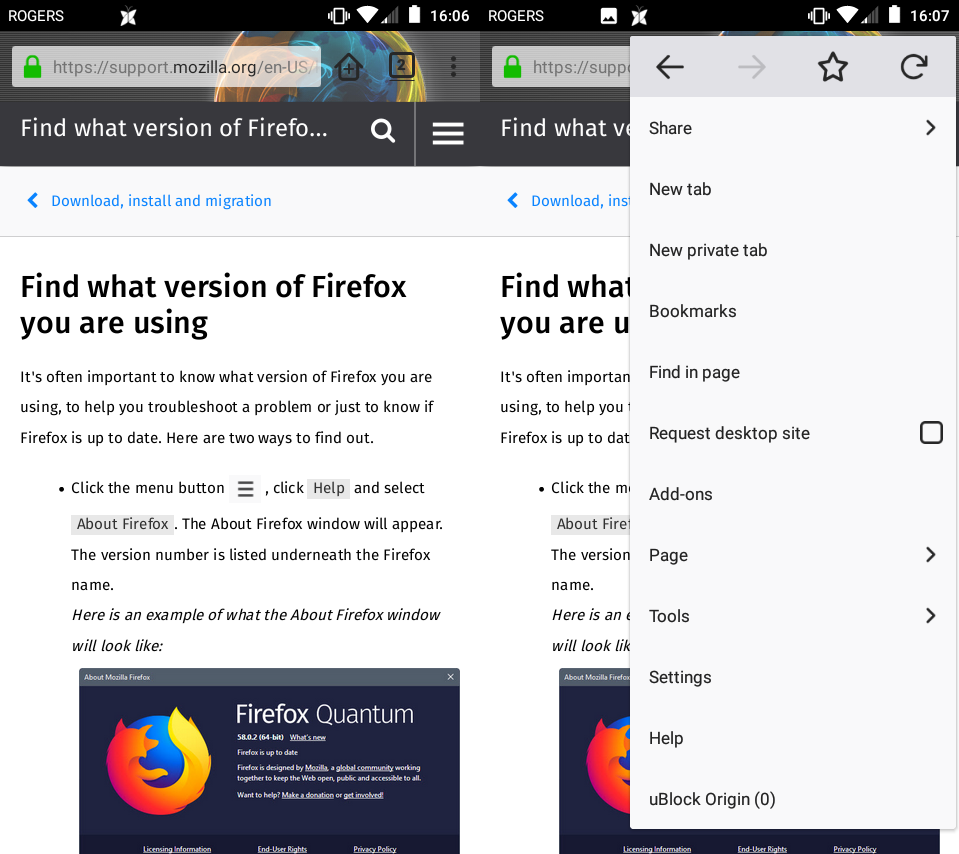
If I tap the 3-vertical-dot menu button, there is no item to tell you what version you are using. If you choose Help in the menu and search "how do i find what version i am using" a help article tells you to tap the hamburger menu (outdated - is now 3-vertical-dot menu button) and choose Help -> About, but that is missing.
ჩასწორების თარიღი: , ავტორი: codywohlers
ყველა პასუხი (5)
WORKAROUND: You can navigate to about:firefox
The article you were looking at is for desktop Firefox for Windows, Mac, Linux.
For Android Firefox https://support.mozilla.org/en-US/kb/update-latest-version-firefox-android
James said
The article you were looking at is for desktop Firefox for Windows, Mac, Linux. For Android Firefox https://support.mozilla.org/en-US/kb/update-latest-version-firefox-android
Thanks for the reply. I got to that page by clicking the 3-dot-menu button and choosing "Help" so I guess that's another issue with the menu, it doesn't take you to the correct help page.
Edit: I have to latest version from the Google Play Store (v 64.0.2)
ჩასწორების თარიღი: , ავტორი: codywohlers
Hello,
I am glad to hear that your problem has been resolved. If you haven't already, please select the answer that solves the problem. This will help other users with similar problems find the solution more easily.
Thank you for contacting Mozilla Support.
It's not resolved. There's stil no way to check the version without knowing about the secret about:firefox page.
And the help option IN THE MENU takes you to the desktop help site.