


PDF: One PDF opens, another shows downloadpanel, why?

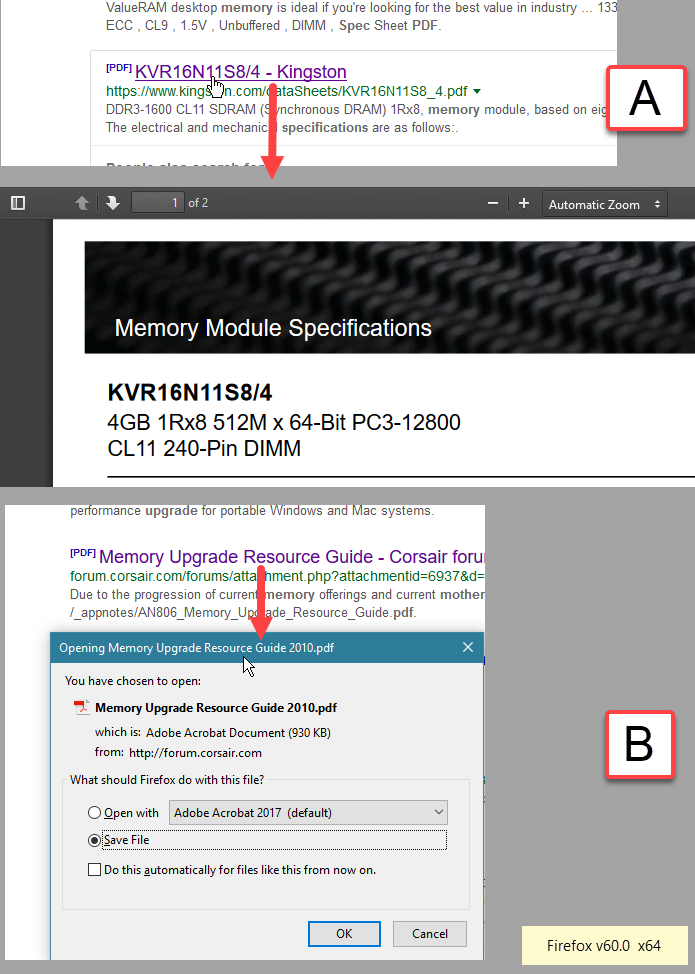
It strikes me that Firefox sometimes behave differently when clicking on a PDF link. It may open the PDF (my preferred way), so I can view it and decide whether I would like to save it or not (Options->Applications->Preview in Firefox is set), but with another PDF it will show me the download panel, offering to either download or open in Acrobat.
How come that Firefox is acting differently?
-
ყველა პასუხი (2)
Those files have different response headers.
In a regular HTTP response, the Content-Disposition response header is a header indicating if the content is expected to be displayed inline in the browser, that is, as a Web page or as part of a Web page, or as an attachment, that is downloaded and saved locally.
შერჩეული გადაწყვეტა
Okay, many thanks indeed. All clear. Then this is probably beyond the control of FF and FF therefore can not override this behavior. Will set Acrobat to open the file. When I then want to save the file, it is not just click on the save button, but click File, click File Save As.. Click on folder, click on Save.
Anyway, thank again!