


Unauthorized network activity in Firefox

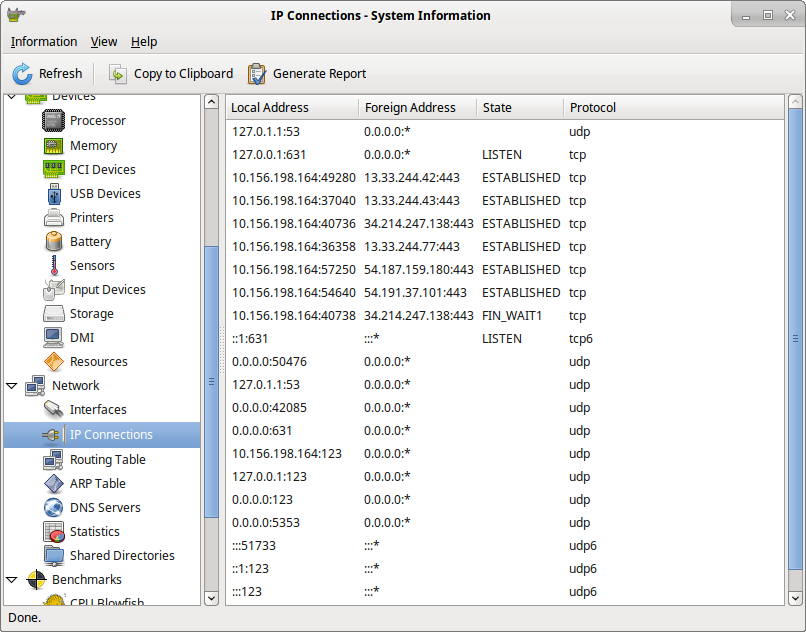
You say that you are protecting privacy. I disabled most of the "harmful" settings (as well as pocket, screenshooter, push notifications, captive portal, updates and others, including in about:config, no extensions, no sync). I launch Linux HardInfo, launch Firefox and see many IP connections with amazonaws.com and cloudfront.net. Why does Firefox connect to these IPs? How to prevent this? I do not want the browser to connect without permission.
გადაწყვეტა შერჩეულია
That's what I did. In about:config cleared ALL the lines (and there were many of them) containing http. Now there is no unauthorized network activity at startup.
პასუხის ნახვა სრულად 👍 0ყველა პასუხი (10)
amazonaws.com and cloudfront.net comes from the sites that uses those servers on websites you visit or login to. Those have nothing to do with FF but the sites you go to that are the host servers.
I'm run Firefox with blank page (start tab and history also clear). Firefox doesn't need to connect anywhere.
DenisLp said
...and see many IP connections with amazonaws.com and cloudfront.net. Why does Firefox connect to these IPs? How to prevent this? I do not want the browser to connect without permission.
Mozilla uses a CDN to deliverer the files you download from say a *.mozilla.org page like www.mozilla.org/firefox/all/ and by internal updates.
Mozilla has been using the CDN since they discontinued the mirrors system they used up til August 2012.
შერჩეული გადაწყვეტა
That's what I did. In about:config cleared ALL the lines (and there were many of them) containing http. Now there is no unauthorized network activity at startup.
Note that the OP is on the Linux platform.
Happy112 I'm using Ubuntu Linux and I don't have pop-up tabs.
@ DenisLp and cor-el :
Being a Windows10 person, I had no idea - hence I added :
" Just in case .... "
Sorry ......
Have you already worked your way through this article: How to stop Firefox from making automatic connections?
jscher2000 Thank you. Much of what is described there has already been done, but not all. I think through the Fiddler you can find out what the browser is sending, but it's not very interesting to me now.